[TIL] Spring Skills - Filters and Spring Security
Spring Filter pre- and post-request processing, JWT authentication flow, and Spring Security Filter Chain and Authentication structures
한국어 원문은 여기에서 볼 수 있습니다.
What I studied
filter
- Filter
- This is an area managed in the web application and is the first/final stage for requests and responses from clients. Through this, information in requests and responses can be changed or additional functions can be added.
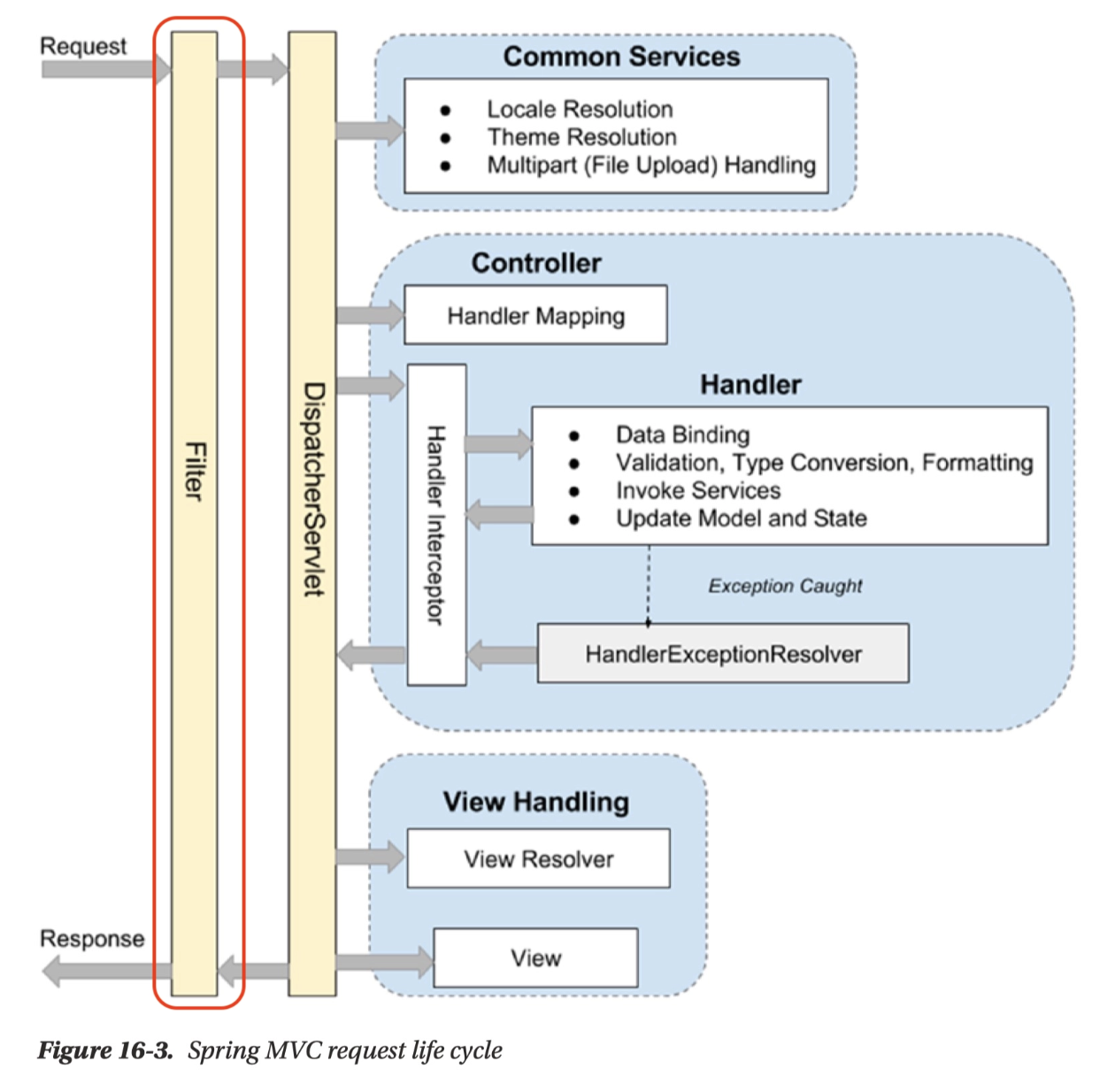
- Mainly used for general-purpose tasks, such as logging and security processing.
It can also handle logic related to authentication and authorization.
The advantage of using Filter is that logic related to authentication and authorization can be managed separately from business logic.
- Filter Chain
- There is not only one filter, but multiple filters can be processed in a chain format.
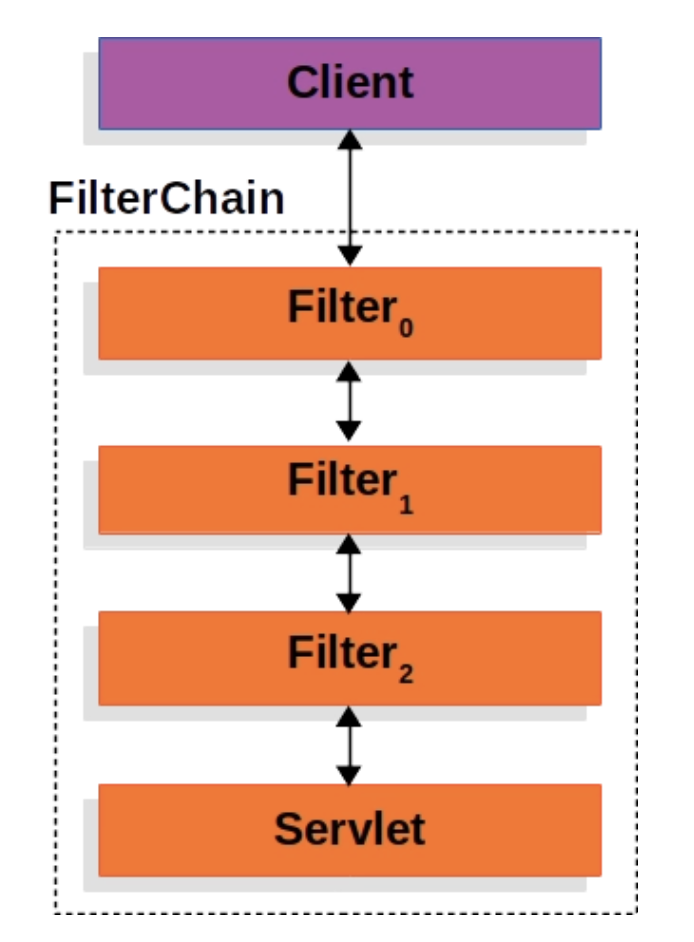
- There is not only one filter, but multiple filters can be processed in a chain format.
Apply Filter
Planning to implement a filter that can process authorization and authentication of the request URL.
Additionally, a filter that logs the request URL will be implemented.
Request URL Logging
1
2
3
4
5
6
7
8
9
10
11
12
13
14
15
16
17
 @Slf4j(topic = "LoggingFilter")
 @Component
 @Order(1)
 public class LoggingFilter implements Filter {
     @Override
     public void doFilter(ServletRequest request, ServletResponse response, FilterChain chain) throws IOException, ServletException {
         // 전처리
         HttpServletRequest httpServletRequest = (HttpServletRequest) request;
         String url = httpServletRequest.getRequestURI();
         log.info(url);

         chain.doFilter(request, response); // 다음 Filter 로 이동

         // 후처리
         log.info("비즈니스 로직 완료");
     }
 }
Specify the order of filters with
@Order(1).Move
chain.doFilter(request, response);to the next Filter.log.info("비즈니스 로직 완료");- After the task is completed, you can check that a pre-response log has been created on the client.
AuthFilter: Authentication and authorization processing filter
1
2
3
4
5
6
7
8
9
10
11
12
13
14
15
16
17
18
19
20
21
22
23
24
25
26
27
28
29
30
31
32
33
34
35
36
37
38
39
40
41
42
43
44
45
46
47
48
49
50
51
52
53
 @Slf4j(topic = "AuthFilter")
 @Component
 @Order(2)
 public class AuthFilter implements Filter {

     private final UserRepository userRepository;
     private final JwtUtil jwtUtil;

     public AuthFilter(UserRepository userRepository, JwtUtil jwtUtil) {
         this.userRepository = userRepository;
         this.jwtUtil = jwtUtil;
     }

     @Override
     public void doFilter(ServletRequest request, ServletResponse response, FilterChain chain) throws IOException, ServletException {
         HttpServletRequest httpServletRequest = (HttpServletRequest) request;
         String url = httpServletRequest.getRequestURI();

         if (StringUtils.hasText(url) &&
                 (url.startsWith("/api/user") || url.startsWith("/css") || url.startsWith("/js"))
         ) {
             // 회원가입, 로그인 관련 API 는 인증 필요없이 요청 진행
             chain.doFilter(request, response); // 다음 Filter 로 이동
         } else {
             // 나머지 API 요청은 인증 처리 진행
             // 토큰 확인
             String tokenValue = jwtUtil.getTokenFromRequest(httpServletRequest);

             if (StringUtils.hasText(tokenValue)) { // 토큰이 존재하면 검증 시작
                 // JWT 토큰 substring
                 String token = jwtUtil.substringToken(tokenValue);

                 // 토큰 검증
                 if (!jwtUtil.validateToken(token)) {
                     throw new IllegalArgumentException("Token Error");
                 }

                 // 토큰에서 사용자 정보 가져오기
                 Claims info = jwtUtil.getUserInfoFromToken(token);

                 User user = userRepository.findByUsername(info.getSubject()).orElseThrow(() ->
                         new NullPointerException("Not Found User")
                 );

                 request.setAttribute("user", user);
                 chain.doFilter(request, response); // 다음 Filter 로 이동
             } else {
                 throw new IllegalArgumentException("Not Found Token");
             }
         }
     }

 }
httpServletRequest.getRequestURI()Get the request URL and separate it. (authorization)- URLs starting with
"/api/user","/css", and"/js"are excluded from authentication processing.
- URLs starting with
Other URLs undergo authentication processing.
jwtUtil.getTokenFromRequest(httpServletRequest);- Get the Cookie list fromhttpServletRequestand find the Cookie where the JWT is stored.Implement the
getTokenFromRequestmethod in JwtUtil.1 2 3 4 5 6 7 8 9 10 11 12 13 14 15 16
// HttpServletRequest 에서 Cookie Value : JWT 가져오기 public String getTokenFromRequest(HttpServletRequest req) { Cookie[] cookies = req.getCookies(); if(cookies != null) { for (Cookie cookie : cookies) { if (cookie.getName().equals(AUTHORIZATION_HEADER)) { try { return URLDecoder.decode(cookie.getValue(), "UTF-8"); // Encode 되어 넘어간 Value 다시 Decode } catch (UnsupportedEncodingException e) { return null; } } } } return null; }
If tokenValue exists, token parsing and verification are performed and user information is retrieved.
Use the imported user username to check whether the user exists in the DB. If so, authentication is complete.
Passes the authenticated User object to the Controller API that requires user information.
1
2
3
4
5
6
7
8
9
10
11
12
13
  @Controller
  @RequestMapping("/api")
  public class ProductController {

      @GetMapping("/products")
      public String getProducts(HttpServletRequest req) {
          System.out.println("ProductController.getProducts : 인증 완료");
          User user = (User) req.getAttribute("user");
          System.out.println("user.getUsername() = " + user.getUsername());

         return "redirect:/";
      }
  }
Let’s assume that this is an API that only searches products registered by the user.
If you use the User object that has been authenticated in Filter, you can only search for products registered by the user who made the API request.
Spring Security Framework
- Spring Security Framework
- Reduces development effort by providing many functions for authentication and authorization required for Spring server. It is as if the ‘Spring’ framework provides convenience in web server implementation.
Add Spring Security framework
1
2
  // Security
  implementation 'org.springframework.boot:spring-boot-starter-security'
Spring Security applied
Activate Spring Security
Spring Security settings
1
2
3
4
5
6
7
8
9
10
11
12
13
14
15
16
17
18
19
20
21
22
23
24
25
26
27
28
29
30
31
  package com.sparta.springauth.config;

  import org.springframework.boot.autoconfigure.security.servlet.PathRequest;
  import org.springframework.context.annotation.Bean;
  import org.springframework.context.annotation.Configuration;
  import org.springframework.security.config.Customizer;
  import org.springframework.security.config.annotation.web.builders.HttpSecurity;
  import org.springframework.security.config.annotation.web.configuration.EnableWebSecurity;
  import org.springframework.security.web.SecurityFilterChain;

  @Configuration
  @EnableWebSecurity // Spring Security 지원을 가능하게 함
  public class WebSecurityConfig {

      @Bean
      public SecurityFilterChain securityFilterChain(HttpSecurity http) throws Exception {
          // CSRF 설정
          http.csrf((csrf) -> csrf.disable());

          http.authorizeHttpRequests((authorizeHttpRequests) ->
                  authorizeHttpRequests
                          .requestMatchers(PathRequest.toStaticResources().atCommonLocations()).permitAll() // resources 접근 허용 설정
                          .anyRequest().authenticated() // 그 외 모든 요청 인증처리
          );

          // 로그인 사용
          http.formLogin(Customizer.withDefaults());

          return http.build();
      }
  }
Unregister LogginFilter, AuthFilter
1
2
3
4
5
6
7
8
9
10
11
12
13
14
15
16
17
  @Slf4j(topic = "LoggingFilter")
  //@Component
  @Order(1)
  public class LoggingFilter implements Filter {
      @Override
      public void doFilter(ServletRequest request, ServletResponse response, FilterChain chain) throws IOException, ServletException {
          // 전처리
          HttpServletRequest httpServletRequest = (HttpServletRequest) request;
          String url = httpServletRequest.getRequestURI();
          log.info(url);

          chain.doFilter(request, response); // 다음 Filter 로 이동

          // 후처리
          log.info("비즈니스 로직 완료");
      }
  }
1
2
3
4
5
6
7
8
9
10
11
12
13
14
15
16
17
18
19
20
21
22
23
24
25
26
27
28
29
30
31
32
33
34
35
36
37
38
39
40
41
42
43
44
45
46
47
48
49
50
51
52
53
  @Slf4j(topic = "AuthFilter")
  //@Component
  @Order(2)
  public class AuthFilter implements Filter {

      private final UserRepository userRepository;
      private final JwtUtil jwtUtil;

      public AuthFilter(UserRepository userRepository, JwtUtil jwtUtil) {
          this.userRepository = userRepository;
          this.jwtUtil = jwtUtil;
      }

      @Override
      public void doFilter(ServletRequest request, ServletResponse response, FilterChain chain) throws IOException, ServletException {
          HttpServletRequest httpServletRequest = (HttpServletRequest) request;
          String url = httpServletRequest.getRequestURI();

          if (StringUtils.hasText(url) &&
                  (url.startsWith("/api/user") || url.startsWith("/css") || url.startsWith("/js"))
          ) {
              // 회원가입, 로그인 관련 API 는 인증 필요없이 요청 진행
              chain.doFilter(request, response); // 다음 Filter 로 이동
          } else {
              // 나머지 API 요청은 인증 처리 진행
              // 토큰 확인
              String tokenValue = jwtUtil.getTokenFromRequest(httpServletRequest);

              if (StringUtils.hasText(tokenValue)) { // 토큰이 존재하면 검증 시작
                  // JWT 토큰 substring
                  String token = jwtUtil.substringToken(tokenValue);

                  // 토큰 검증
                  if (!jwtUtil.validateToken(token)) {
                      throw new IllegalArgumentException("Token Error");
                  }

                  // 토큰에서 사용자 정보 가져오기
                  Claims info = jwtUtil.getUserInfoFromToken(token);

                  User user = userRepository.findByUsername(info.getSubject()).orElseThrow(() ->
                          new NullPointerException("Not Found User")
                  );

                  request.setAttribute("user", user);
                  chain.doFilter(request, response); // 다음 Filter 로 이동
              } else {
                  throw new IllegalArgumentException("Not Found Token");
              }
          }
      }

  }
- The reason for disabling
@Componentis that if the filter is auto-registered, it may run first outside of the Spring Security flow- CSRFCSRF (Cross-site request forgery)
- The reason for disabling
An attacker uses the session information of cookies stored in an authenticated browser to send a request that the user did not intend to the web server.
= “An attack that pretends to be a logged in user and secretly sends unsolicited requests”- If CSRF is set, the CSRF token value must be passed in html to receive the request.
- CSRF token
When the server provides an HTML page, it secretly provides a special value.
This token must also be sent when making a POST request.
→ The attacker can automatically use the user’s cookies, but the attack is blocked because the attacker does not know the CSRF token value contained in the HTML.
- CSRF token
Since this is an attack using a cookie-based vulnerability, it can be disabled in the REST-based API.
In REST API, the login status is usually managed not by session cookie, but by sending a token directly to the front desk for each request.
1
  Authorization: Bearer JWT토큰
Attack sites cannot freely attach this Authorization header. → So the risk of cookie-based CSRF attacks is relatively low
Therefore, in JWT-based REST API, CSRF protection is usually turned off as shown below.
- Disables CSRF protection instead of processing each POST request.
http.csrf((csrf) -> csrf.disable());
- Spring Security’s default login function
Login form page provided by Spring Security
When an unauthenticated user accesses a URL that requires authentication, Spring Security redirects to the default login form page (
/login)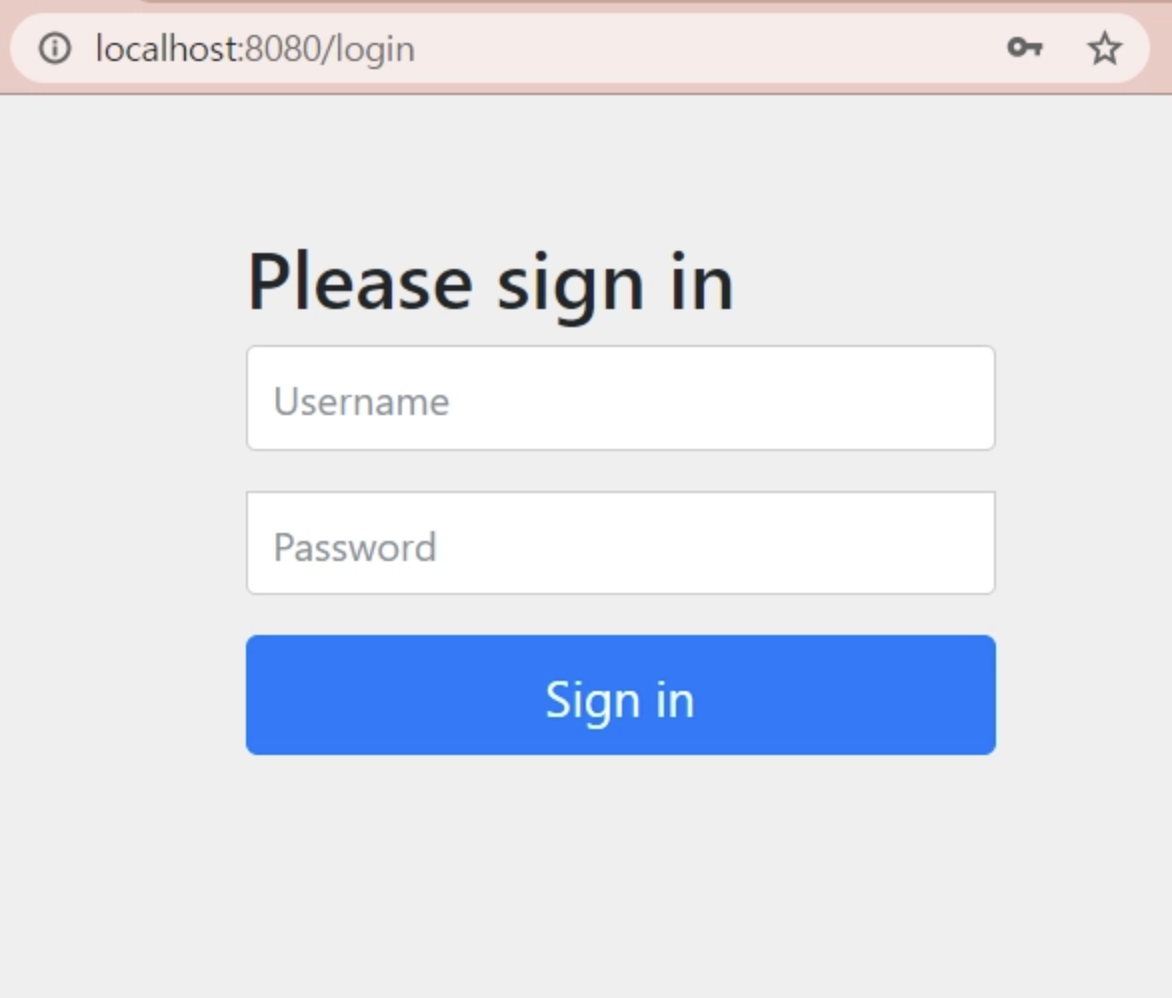
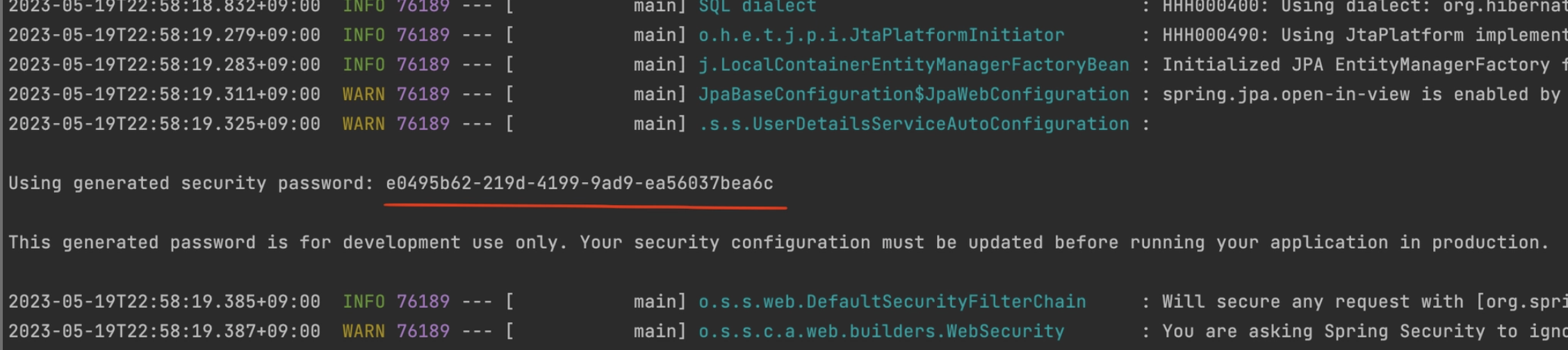
Username: user- Password: S*Check pring log* (Changes every time the server starts)
- Understanding Spring Security
- Spring Security - Filter Chain
In Spring, all calls pass through the DispatcherServlet and are then distributed to the Controller in charge of each request.
At this time, when it is necessary to process each request in common, a step is required before DispatcherServlet and this is FIlter
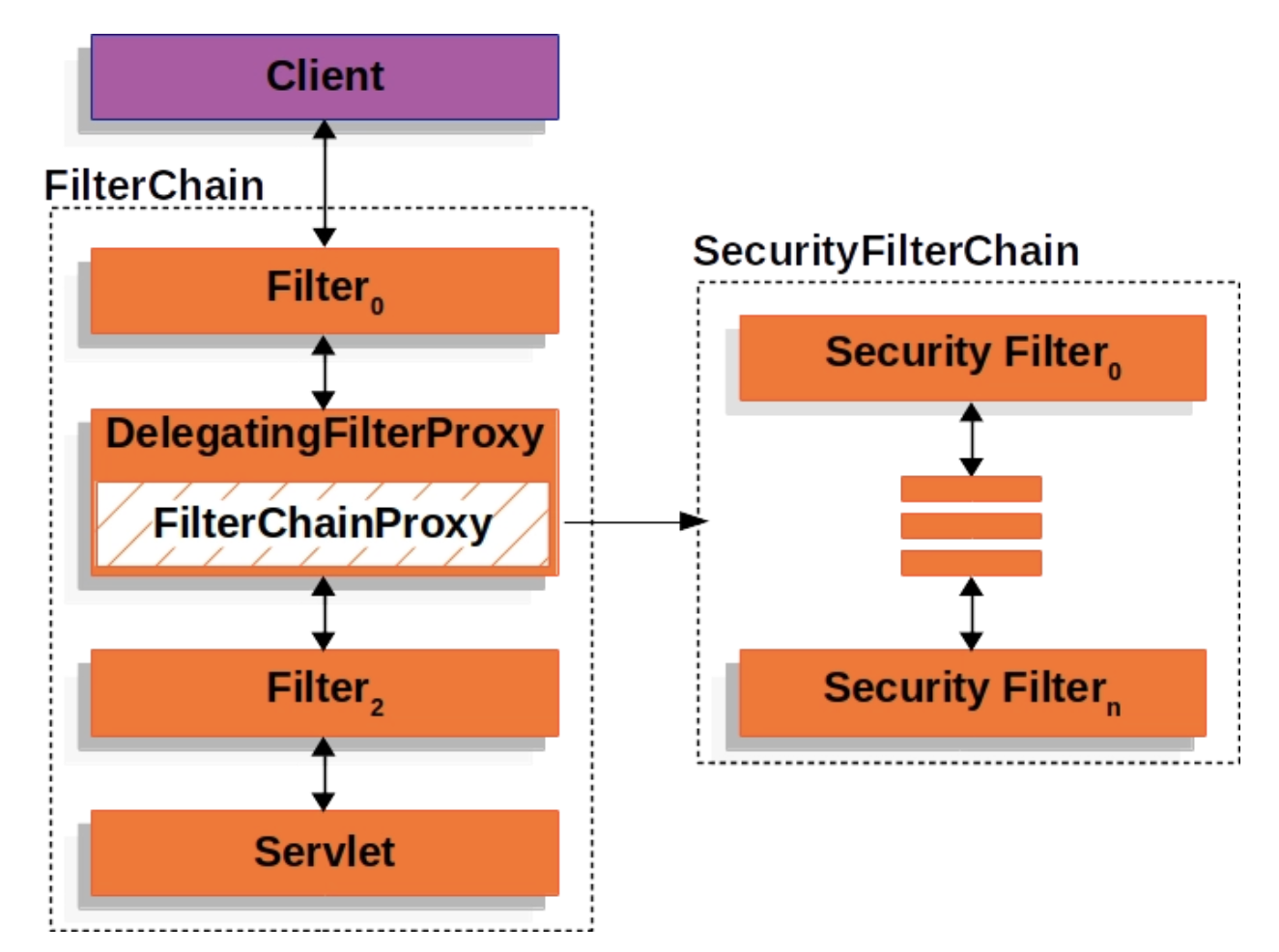
Spring Security also uses Filter to process authentication and authorization.
- Spring Security implements detailed logic through FilterChainProxy.
Form Login based authentication
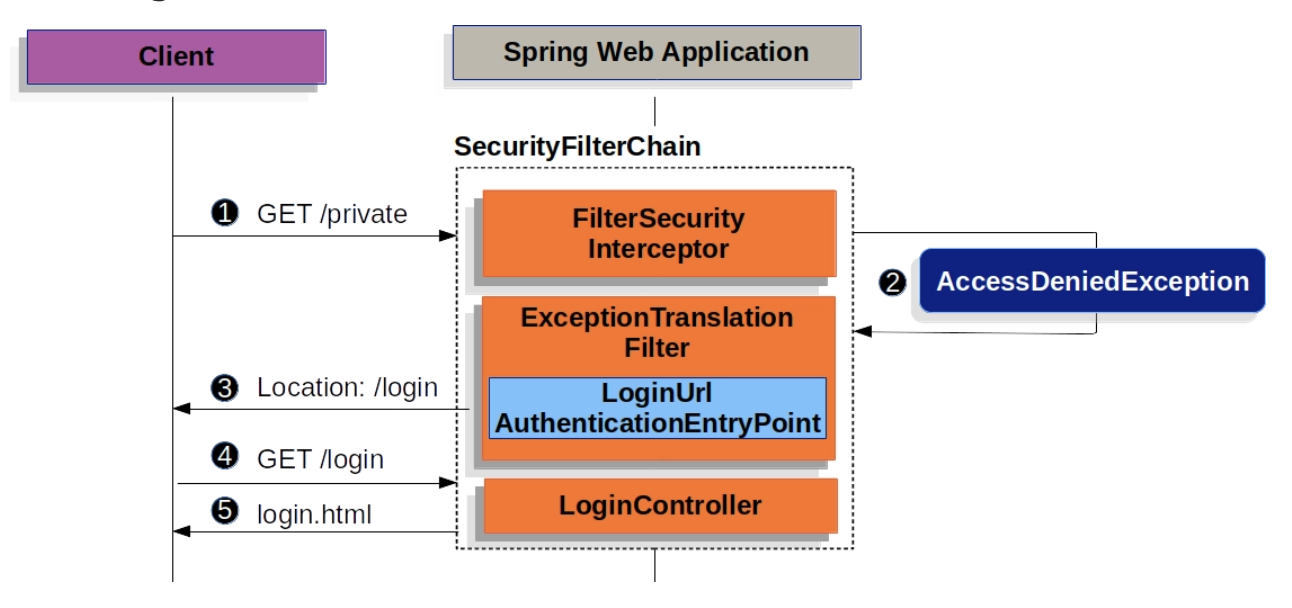
- Form Login-based authentication returns a login page if authentication is not completed when a URL request requiring authentication is received.
UsernamePasswordAuthenticationFilter
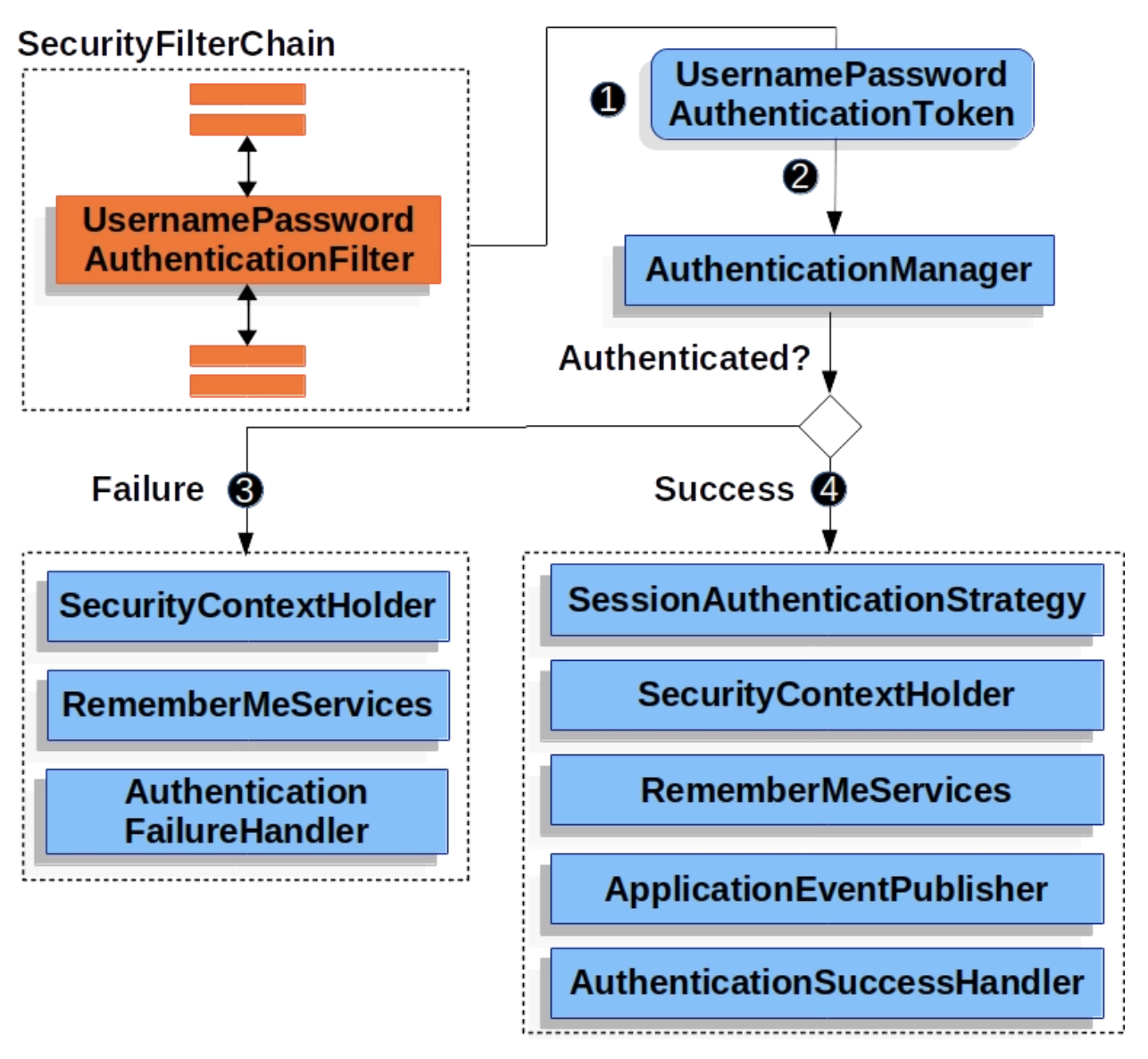
UsernamePasswordAuthenticationFilter is a Filter that inherits AbstractAuthenticationProcessingFilter, a Spring Security filter.
Basically, when using Form Login based, authentication is done by checking username and password.
Certification process
When the user submits the username and password, the UsernamePasswordAuthenticationFilter creates a UsernamePasswordAuthenticationToken, one of the types of Authentication, an authentication object that contains the information of the authenticated user, and passes it to the AuthenticationManager to attempt authentication.
If failed, empty SecurityContextHolder3. If successful, set Authentication in SecurityContextHoler.
- Spring Security - Filter Chain
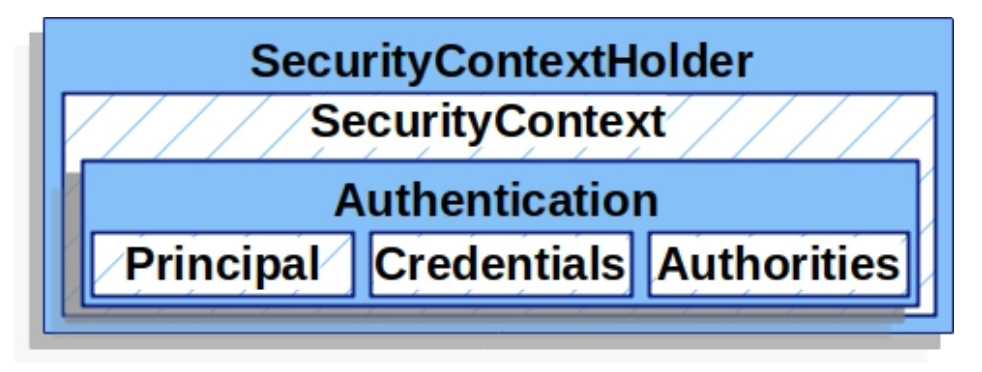
- SecurityContextHoler
- Stores the detailed information (Authentication) of the user who has completed authentication.
- SecurityContext can be accessed through SecurityContextHolder
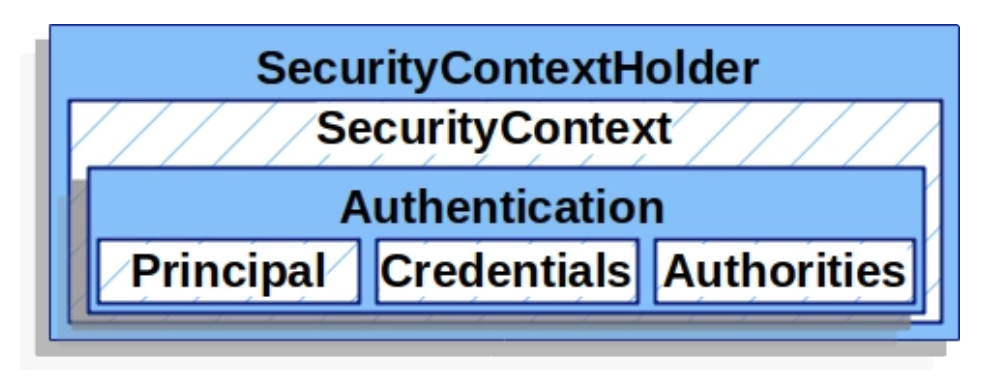
- Authentication
- Indicates the currently authenticated user.
Can be retrieved from SecurityContext
- principal: identifies the user
Typically a UserDetails instance when authenticating with Username/Password method.
credentials: Mainly password, mostly used for user authentication and then left empty
- authorities: The authority granted to the user is abstracted and used as GrantedAuthority.
- UserDetailsService
- When using the username/password authentication method, return UserDetails after querying and verifying the user.
- Can be used after customizing and registering as a bean
UserDetails
Verified UserDetails are used when creating Authentication of the UsernamePasswordAuthenticationToken type, and the corresponding authentication object is set in SecurityContextHoler.
Available for customization