[TIL] Special lecture on Git & PR + CI/CD
Git branch strategy, PR-based collaboration flow, Merge/Rebase differences, and CI/CD automation with GitHub Actions
한국어 원문은 여기에서 볼 수 있습니다.
What I studied
Git Flow branching strategy
Without a branching strategy, accidents can occur, such as your work overwriting a colleague’s work, unfinished code mixed in when you’re about to deploy, or you wanting to roll back but having no reference point.
→ Branch strategy = accident prevention device
5 branches of Git Flow
branch role branch Merge target life mainProduction code. Always deployable — — everlasting developNext release integration branch. Where all features come together First time in main — everlasting feature/*Develop new features develop develop temporary release/*Ready for launch. Allow bug fixes only develop main + develop temporary hotfix/*Emergency fix for operational bugs main main + develop temporary 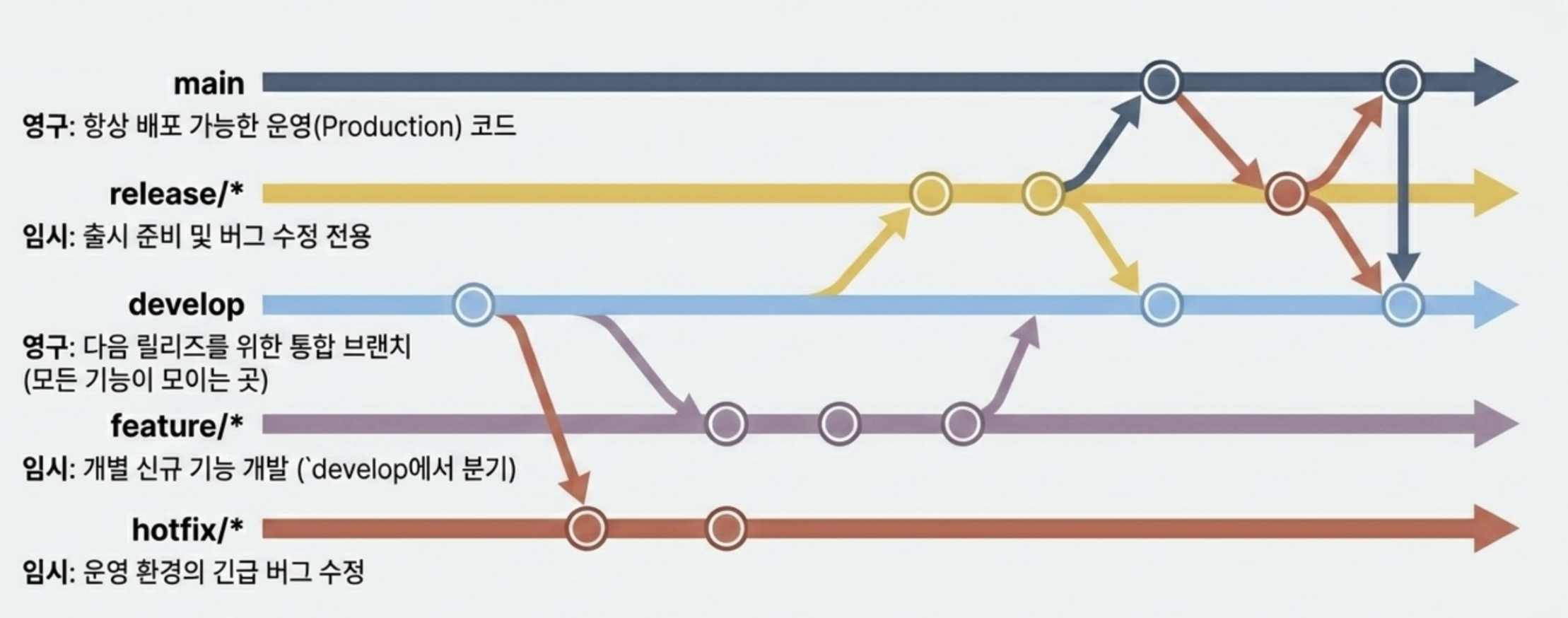
Github Flow and Git Flow
division Git Flow Github Flow branch structure Strictly managed with 5 branches main• Use onlyfeature(simple)suitable situation Regular releases, version management Web services, SaaS, CD where quick deployment is important A domain that fits well Mobile apps, package libraries web service disadvantage complicacy. May be overkill for small teams Difficult to operate multiple versions simultaneously Compatibility with distribution Not compatible with rapid distribution (CD) PR Merge = Immediate Deployment prerequisites — Automated testing is an essential premise
PR Workflow and Code Review
Pull Request (PR): A formal request to merge my branch work into main (or develop)
3 things PR does
role explanation 👀 Code review chapter A space for colleagues to view changes and leave feedback 🧪 Automatic Verification Trigger Execute CI pipeline (automatically perform build/test) 📜 Record change history Permanently preserve why/what/when you changed - PR is a trigger that starts a code review and a change diary that I will read in the future.
PR life cycle
1
2
3
4
5
6
  1. Branch → feature/login 같은 작업 브랜치 생성
  2. Commit & Push → 작업 내용을 원격에 푸시
  3. Open PR → GitHub UI에서 PR 생성, 리뷰어 지정
  4. Review → 코드 리뷰 + CI 검증 → 수정 → 재푸시
  5. Approve & Merge → 승인 후 머지, 브랜치 삭제
Actual command flow
1
2
3
4
5
6
7
8
9
10
11
  # 1. 브랜치 생성
  git checkout -b feature/login

  # 2. 커밋
  git add .
  git commit -m "feat(auth): 로그인 토큰 검증 로직 추가"

  # 3. 푸시
  git push origin feature/login

  # 4~5. 여기서부터는 GitHub/GitLab 웹 UI에서 진행
How to write a good PR
Break it down into small pieces - 200 to 400 lines / single purpose
Title should be clear in one line - ex)
[FIX] 로그인 토큰 만료 시 자동 리프레시 처리Include context in the text
1
2
3
4
5
6
7
8
9
10
11
12
13
14
15
  ## What
  - AccessToken 만료 시 자동으로 RefreshToken으로 재발급

  ## Why
  - 사용자가 30분 후 갑자기 로그아웃되는 이슈 (#142)

  ## How
  - AxiosInterceptor에 401 응답 시 재발급 로직 추가
  - 동시 요청 race condition은 Promise 큐로 직렬화

  ## Test
  - [x] 단위 테스트 추가 (auth.spec.ts)
  - [x] QA 시나리오 통과
  - [ ] 부하 테스트는 별도 PR
Self-review first - Re-read self-PR immediately after push
Code review is not censorship
- As a reviewer,
Criticize the code, but not the people
Ask questions first, no assumptions
Praise the things you did well
- As an author,
Explain your intentions without being defensive.- If you agree, reflect, if you disagree, discuss based on the evidence.
Reviews will be responded to within 24 hours
Thank you
- As a reviewer,
Merge and Rebase
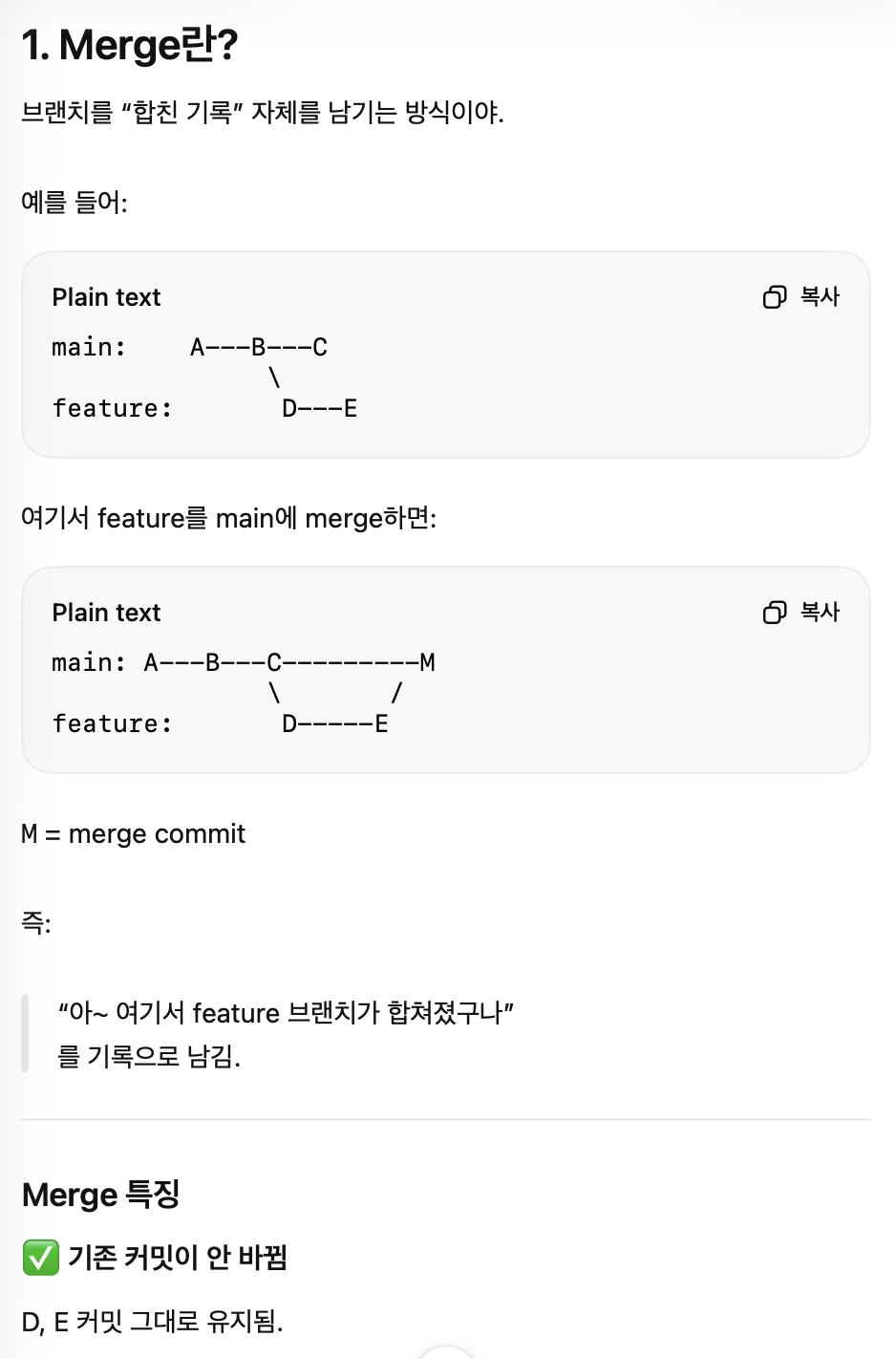
Merge: Merge commit to combine two histories
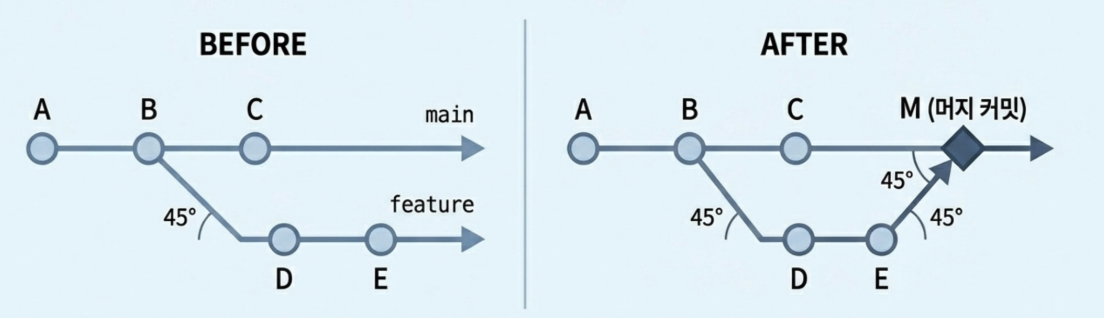
Preservation of history - who worked on which branch remains intact
Safe - existing commits are never changed
History becomes complicated - As merge commits accumulate, git log becomes complicated.
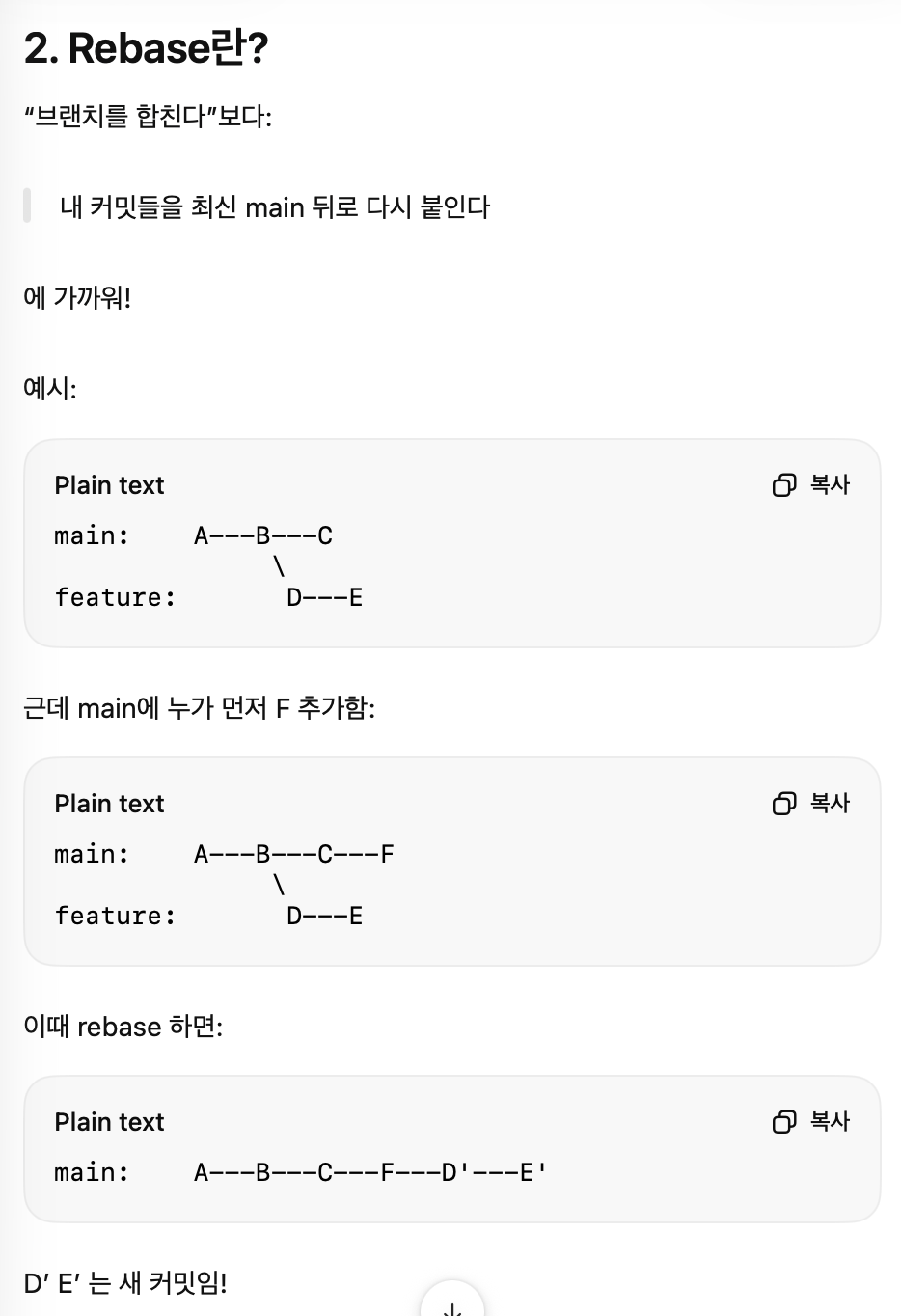
Rebase: Paste my commit at the end of main
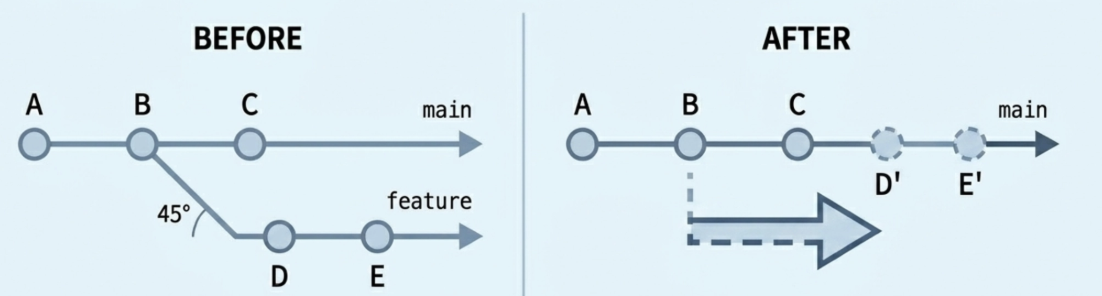
History is clean - git log is in one straight line
No merge commits - remove noise
Existing commits are replaced by new commits - Collaboration is destroyed if done on a shared branch
When to use what (Merge & Rebase)
standard Merge Rebase history preserved as is organized in one line commit hash unchanged Newly created Conflict handling at once per commit Recommended Situation Shared branch integration Clean up my local branch → You should never rebase a public branch that has already been pushed
What you should never do
git push -- forceon the shared branch → completely destroys the colleague’s commit- Where force push is safe
My local feature branch
I push it, but only I use the branch.
Clean up commits just before PR merge
After reflecting the review, squash
- Absolutely prohibited.
main/developBranch pushed by multiple people
Merged PR branch
Branch with release tag<div class="notion-callout" markdown="1">
→ If force push is required, always use --force-with-lease
</div>
Conflict resolution
Conflicts occur when two branches modify the same line in the same file differently.
Conflict markers that Git leaves in files
1
2
3
4
5
  <<<<<<< HEAD
    private final int TIMEOUT = 3000;       // 내 변경 (현재 브랜치)
  =======
    private final int TIMEOUT = 5000;       // 들어오는 변경 (다른 브랜치)
>>>>>>> feature/api
→ Conflicts are not errors, but Git is requesting my judgment.
5 steps to conflict resolution
Check current status -
git statusOpen the file and find the marker
Check the location of<<<<<<</=======/>>>>>>>→ Decide which code to useModify to desired form
Staging + Commit
1
2
3
 git add .
 git commit
 # 머지 진행 중 상태가 종료됨
Test + Push
1
2
 npm test       # 충돌 해결로 깨진 곳이 없는지 반드시 확인
 git push
If it’s still a mess
1
2
  git merge --abort   # 머지 시작 전으로 되돌림
  git rebase --abort  # rebase 중이면
CI/CD Pipeline Introduction
Difference between manual deployment and automation
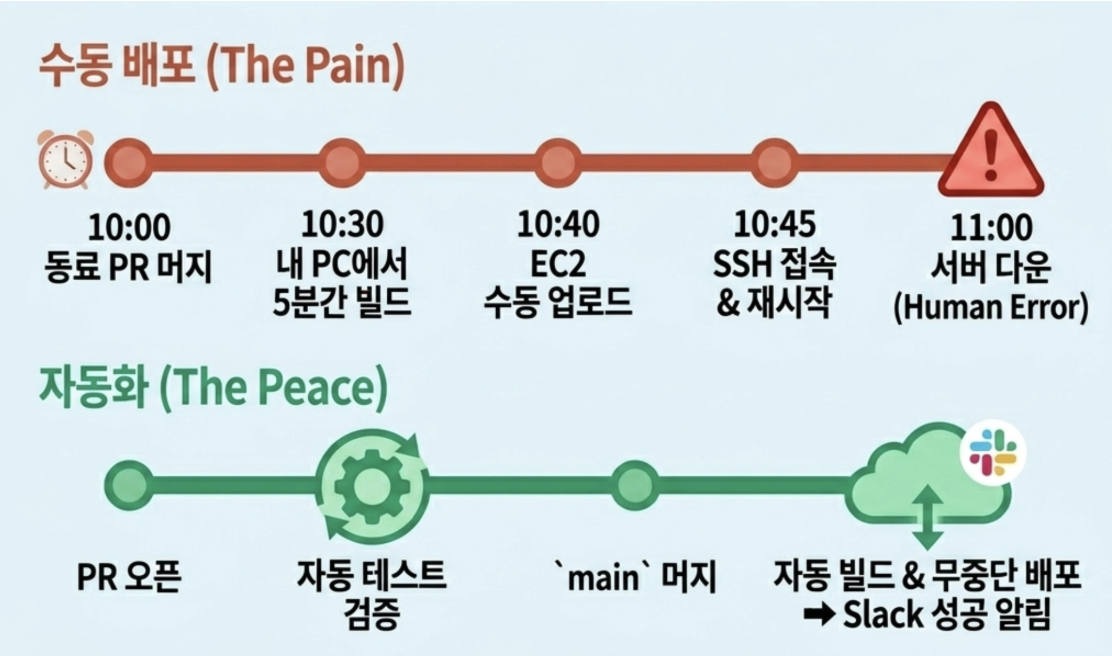
- After introducing CI/CD
Test runs automatically when PR is raised
main merge = automatic deployment
Immediate Slack notification in case of failure
No room for human error
Number of distributions ↑ / Accidents ↓
- After introducing CI/CD
CI/CD pipeline flow
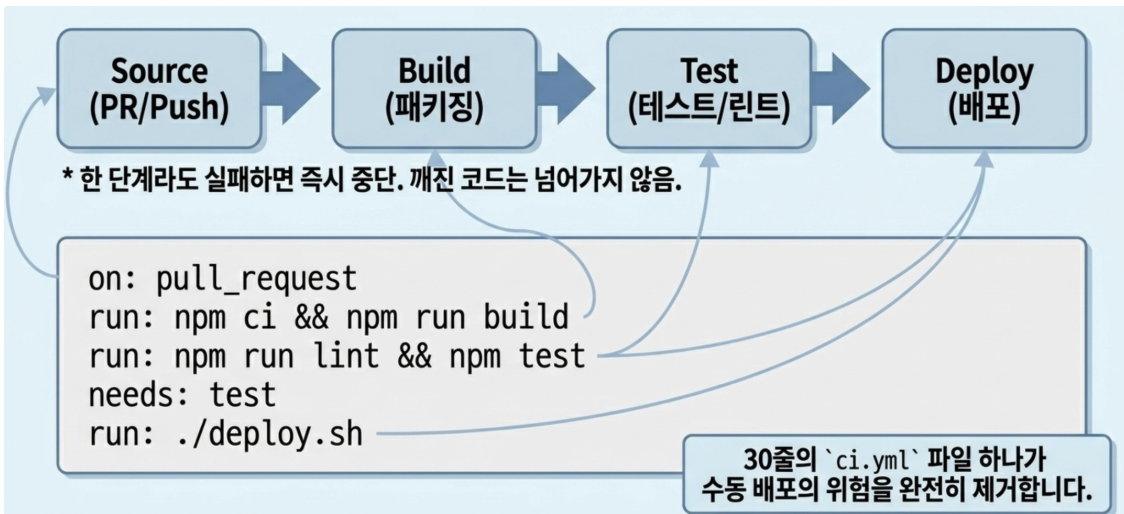
step what to do Source Triggered by PR/Push event Build Compilation / packaging / Docker image creation Test Unit Testing + Integration Testing + Lint Deploy Stage environment deployment → Prod deployment → If even one step fails, it stops immediately + notification / broken builds never advance to the next step
| abbreviation | full name | meaning |
|---|---|---|
| C.I. | Continuous Integration | Frequent code integration and automatic verification |
| CD | Continuous Delivery | Stay deployable at any time (manual approval) |
| CD | Continuous Deployment | If passed, automatically distributed to operation |
Get started in 30 lines with Github Actions
###.github/workflows/ci.yml1 2 3 4 5 6 7 8 9 10 11 12 13 14 15 16 17 18 19 20 21 22 23 24 25 26 27 28 29 30 31 32 33 34 35 36 37 38 39
name: CI on: push: branches: [main, develop] pull_request: branches: [main, develop] jobs: build-and-test: runs-on: ubuntu-latest steps: - name: 코드 체크아웃 uses: actions/checkout@v4 - name: JDK 17 설정 uses: actions/setup-java@v4 with: distribution: 'temurin' java-version: '17' - name: Gradle Wrapper 캐시 uses: gradle/actions/setup-gradle@v3 - name: gradlew 실행 권한 부여 run: chmod +x ./gradlew - name: 테스트 실행 run: ./gradlew test - name: 빌드 run: ./gradlew build -x test - name: 테스트 결과 리포트 if: always() # 테스트가 실패해도 리포트는 업로드 uses: actions/upload-artifact@v4 with: name: test-reports path: build/reports/tests/test
- What happens the moment it moves
When you upload a PR, GitHub automatically executes the above sequence.
If even one step fails, mark x in PR
Merge button is automatically disabled (when Branch Protection is set)
Merge is possible only if all checks pass.
One step further to CD
1
2
3
4
5
6
7
8
9
10
11
12
13
14
15
16
17
18
19
20
  deploy:
    needs: build-and-test     # 위 job이 성공해야만 실행
    if: github.ref == 'refs/heads/main'
    runs-on: ubuntu-latest
    steps:
      - uses: actions/checkout@v4

      - name: JDK 17 설정
        uses: actions/setup-java@v4
        with:
          distribution: 'temurin'
          java-version: '17'

      - name: JAR 빌드
        run: ./gradlew bootJar -x test

      - name: AWS EC2로 배포
        run: ./scripts/deploy.sh build/libs/app.jar
        env:
          AWS_KEY: $
needs: test— If the test fails, it will not be distributedif: github.ref == 'refs/heads/main'— only during main mergesecrets.*— Sensitive information is stored in GitHub Secrets
- What happens the moment it moves
Problems & Errors
Q. Should I use Squash merge / Rebase merge / Merge commit?> There is no right answer. The answer is to set a team convention and go consistently
Squash merge: compresses PR into 1 commit / cleanest history (most used)
Rebase merge: Attach PR commits in a row to main / Enable track of commit units
Merge commit: Merge commit creation / PR units are clearly distinguished
Q. Merge & Rebase
Q. This is my first time with CI/CD. Where do I start?
Start with one of the simplest workflows in GitHub Actions.
Just run
npm testautomatically first.Add builds as you get used to it
Then deploy Most people give up trying to “automate everything at once”.