[TIL] Spring Basics - JPA and Persistence Context
Core principles of Inversion of Control (IoC) and Dependency Injection (DI), and Spring IoC container and Bean management
한국어 원문은 여기에서 볼 수 있습니다.
What to do today
What I studied
IoC Containers and Beans
- To use DI, object creation must take priority.
- But when, where and who creates objects? -> The Spring framework takes over the role of creating and managing necessary objects.
- Spring IoC Container
- Container containing ‘Beans’ Bean
- Object managed by Spring
- How to register Spring ‘Bean’
@Component: Set on the class you want to register as ‘Bean’- When the Spring server starts, ‘Bean’ is saved in the IoC container.
- When saved in Spring ‘Bean’, only the first letter of the name -> class is changed to lowercase. ex)
public class MemoService-> saved asmemoService
@ComponentScan: When the Spring server starts up, it checks the package location and all sub-packages set in@ComponentScanand registers the classes for which@Componentis set as ‘Bean’.- Default set by
@SpringBootApplication(Exists in ~Application.java)
- Default set by
- How to use Spring ‘Bean’ -
@Autowired- Use over field
1
2
3
4
5
6
7
8
 @Component
 public class MemoService {

     @Autowired
     private MemoRepository memoRepository;

         // ...
 }
Spring injects DI, i.e. dependency, into the field of memoRepository ‘Bean’ stored in the IoC container.
- Above the method to be used when injecting ‘Bean’ ``` java @Component public class MemoService {
1 2 3 4 5 6 7 8
private final MemoRepository memoRepository; @Autowired public MemoService(MemoRepository memoRepository) { this.memoRepository = memoRepository; } // ... } ``` Because it can ensure object immutability, it is generally better to use constructors for DI. - Use over field
@AutoWiredapplication conditions Only ‘Bean’ objects managed by the Spring IoC container can be used for DI@AutoWiredOmitted condition- Starting from Spring 4.3, it can be omitted only when there is one constructor declaration.
Using Lombok’s
@RequiredArgsConstructor, you can code like this: ``` java @Component @RequiredArgsConstructor // final로 선언된 멤버 변수를 파라미터로 사용하여 생성자를 자동으로 생성합니다. public class MemoService {private final MemoRepository memoRepository;
// public MemoService(MemoRepository memoRepository) { // this.memoRepository = memoRepository; // }
1
 ...
} ``` -ApplicationContext
- Container with expanded functionality by inheriting BeanFactory, etc.
- BeanFactory: IoC object responsible for controlling the creation and relationship setting of ‘Beans’
- You can manually fetch ‘Bean’ from Spring IoC container
3 Layer Annotation
- Spring 3 Layer Annotation is used to specify the role of the ‘Bean’ class when registering classes divided into the roles of Controller, Service, and Repository as ‘Bean’.
@Controller,@RestController,@Service,@Repository- Since
@Componentis added to all Spring 3 Layer Annotations, register as a ‘Bean’ using the 3 Layer Annotation rather than@Component.
###JPA
- When dealing directly with the DB as before
1
2
3
4
5
public class Memo {
  private Long id;
  private String username;
  private String contents;
}
- Vulnerable to change as it is dependent on SQL
- The SQL must be modified directly, and the part where the value is entered into the MemoResponseDto object must also be modified.
- ORM (Object-Relational Mapping)
- Tool that maps the relationship between objects and DB
- Object: Object-oriented language (Java, Python)
- Relational: Relational database (H2, MySQL)
- JPA (Java Persistence API)
- Standard specification for Java ORM technology
- Operates between application and JDBC
- If you use JPA, the DB connection process is handled automatically without you having to develop it yourself.
- Because DB data can be handled indirectly through objects, DB work can be handled very easily.
Hibernate
- JPA is a standard specification, and among the frameworks that actually implement it, the de facto standard is Hibernate
- SpringBoot uses Hibernate implementation by default.
Entity
- Entity
- Class managed in JPA = i.e. means object
- Entity class is mapped to DB table and managed by JPA
- Create Entity class
1
2
3
4
5
6
7
8
9
10
11
12
13
14
15
@Entity // JPA가 관리할 수 있는 Entity 클래스 지정
@Table(name = "memo") // 매핑할 테이블의 이름을 지정
public class Memo {
  @Id
  private Long id;

  // nullable: null 허용 여부
  // unique: 중복 허용 여부 (false 일때 중복 허용)
  @Column(name = "username", nullable = false, unique = true)
  private String username;

  // length: 컬럼 길이 지정
  @Column(name = "contents", nullable = false, length = 500)
  private String contents;
}
-
@Entity: Can be specified as an Entity class that JPA can manage.@Entity(name="Memo"): Entity class name can be specified (default: class name)- Since JPA uses the default constructor when instantiating the Entity class, you must check whether the default constructor is being created in the current Entity class.
@Table: Specifies the table to be mapped. -@Table(name="memo"): You can specify the name of the table to be mapped (default: Entity name)@Column(name="username", nullable=false, unique=true): You can specify the column of the table to be mapped to the field (default: object field name)@Id: Specifies the primary key of the table.- This primary key serves as an identifier used to distinguish and manage entities in the persistence context. -> An error occurs if you save without entering the primary key, i.e. identifier value.
- Setting only the
@Idoption creates the inconvenience of requiring the developer to manually check and enter the primary key value. -> By adding the@GeneratedValueoption, you can delegate primary key creation to the DB. ex)@GeneratedValue(strategy = GenerationType.IDENTITY)
Persistence context
- From the perspective of an object, ‘the property of an object that allows it to freely maintain and move through life (the time the object is maintained) or space (the location of the object)’
- Space created to manage Entity objects efficiently and easily
- JPA stores and manages Entity objects in the persistence context and communicates with the DB.> EntityManager
- Administrator who manages the entity
- An EntityManager is required to access the persistence context and manipulate Entity objects.
- Developers can use EntityManager to store, view, modify, and delete Entities.
- EntityManager can be created and used through EntityManagerFactory
- EntityManagerFactory
- Typically, only one is created in each DB and used while the application is running.
- EntityManager can be created and used through EntityManagerFactory
- In order to create EntityManagerFactory, information about the DB must be passed.
EntityManagerFactory emf = Persistence.createEntityManagerFactory("memo");- When you call the code, JPA creates an EntityManagerFactory based on the information in persistence.xml.
EntityManager em = emf.createEntityManager(); - When you call your code, you can create an EntityManager using EntityManagerFactory.
- When you call the code, JPA creates an EntityManagerFactory based on the information in persistence.xml.
Transactions in JPA
- Transaction
- A logical concept to maintain the integrity and consistency of DB data
- A concept created to safely manage DB data
- Multiple SQLs can be included in one transaction
- At this time, if all SQLs are successfully executed, the changes are permanently reflected in the DB, but if even one of the SQLs fails, all changes are reverted.
- JPA efficiently manages entities using DB’s transaction concept.
- Saving Entity objects in the persistence context does not immediately reflect them in the DB.
- Just as a DB includes multiple SQLs in one transaction and then permanently reflects the change at the end, JPA also holds all the information on changed objects managed in the persistence context in a write-delayed storage and finally requests the SQL to the DB at once to reflect the change
- To apply this concept of transaction in JPA, you can import EntityTransaction from EntityManager and apply transaction.
EntityTransaction et = em.getTransaction();- You can manage transactions by getting EntityTransaction by calling the corresponding code.
et.begin();: Command to start a transaction.et.commit();: This is a command that permanently reflects transaction operations in the DB.et.rollback();: This is a command that cancels all transaction work and returns to the previous state when an error occurs.
- You can manage transactions by getting EntityTransaction by calling the corresponding code.
Features of persistence context
- Persistence context: A space created to manage Entity objects efficiently and easily.
Primary cache
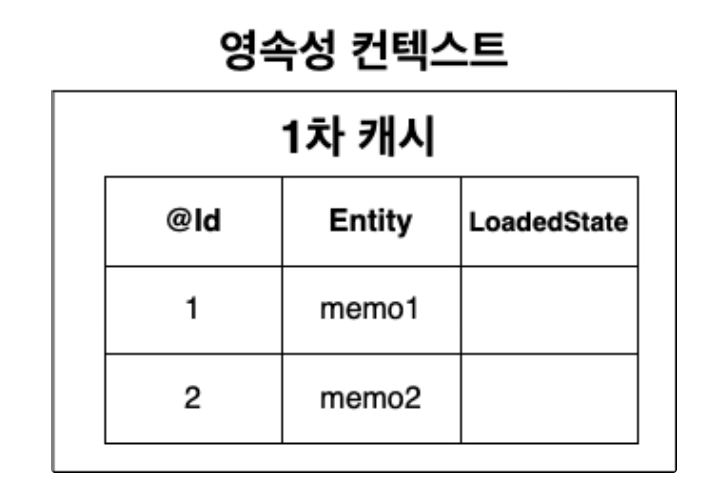
- Persistence context has internal cache storage.
- This means that stored Entity objects are stored in the primary cache, that is, cache storage.
- Cache storage is in the form of a Map data structure.
- key stores the primary key mapped to
@Id, i.e. the identifier value. - value stores the object of the corresponding Entity class.
- The persistence context identifies and manages Entity objects using the identifier value stored in the cache storage key. -Save Entity
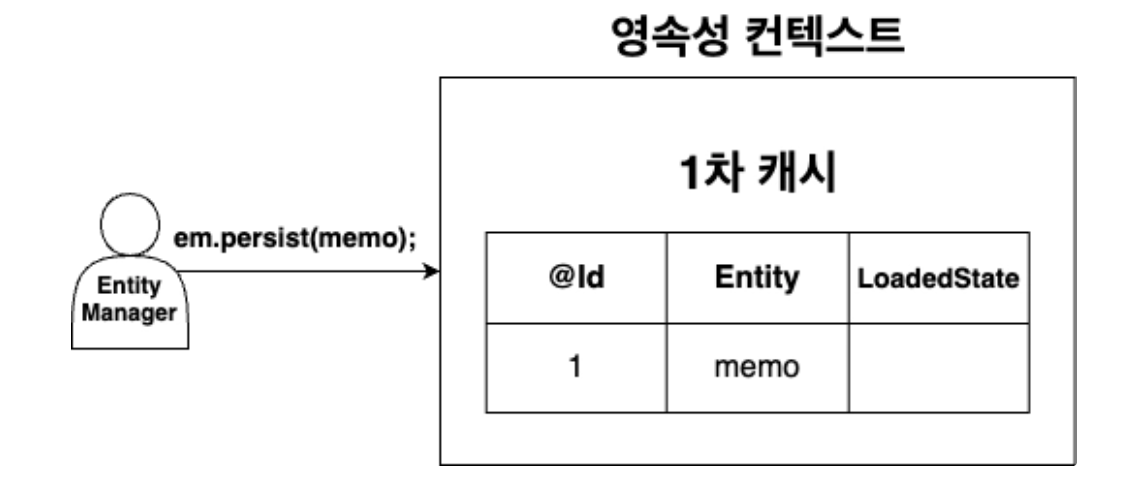
- When the
em.persist(memo)method is called, the memo Entity object is stored in the cache storage.
- key stores the primary key mapped to
- Entity lookup
- When the ID being searched does not exist in the cache storage
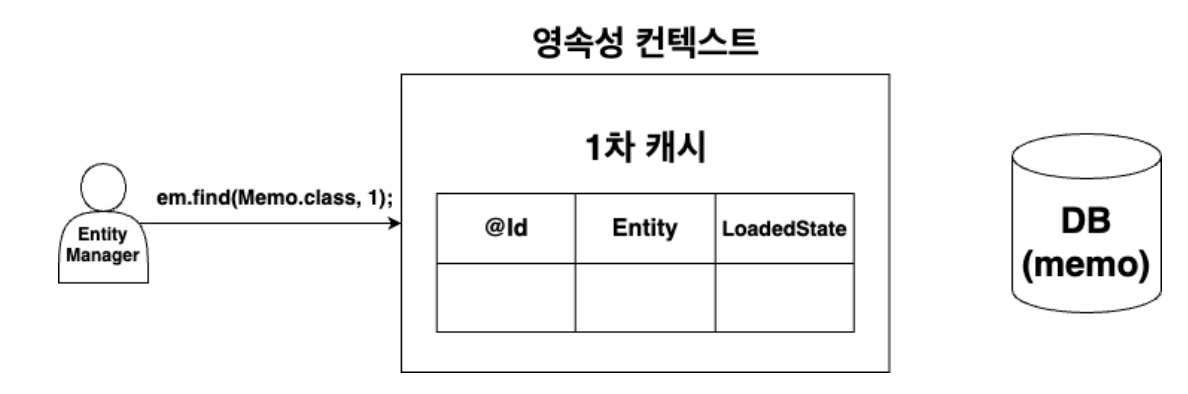
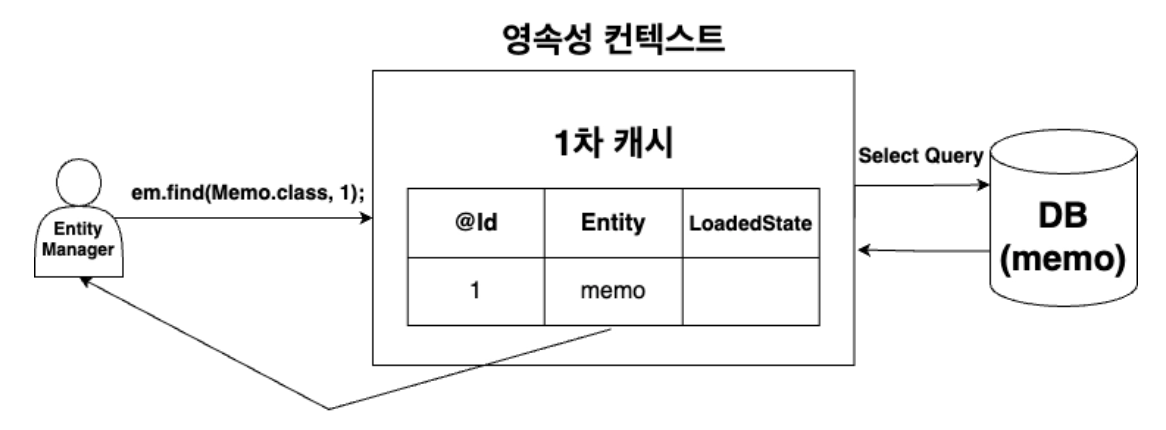 a. Cache store query
 em.find(Memo.class, 1);b. After DB SELECT query, save to cache storage What if the value is not found after checking the cache storage when callingem.find(Memo.class, 1);? -> After DB SELECT query, the corresponding value is stored in the cache storage and returned.- When you just search data in the DB, the data does not change, so you can search even without a transaction.
- If the ID being searched exists in the cache storage
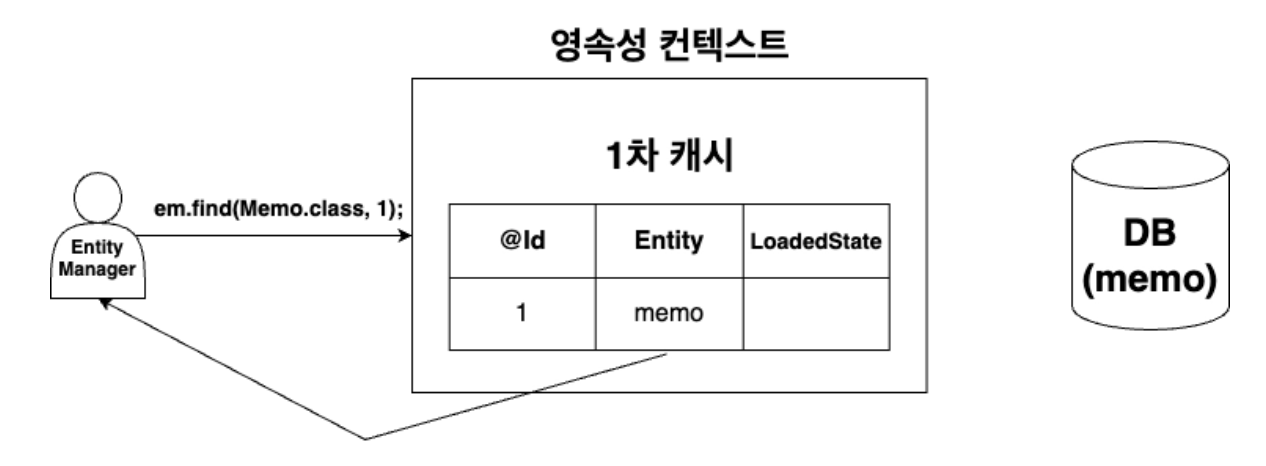 When calling
 em.find(Memo.class, 1);, the cache storage is checked to see if there is a Memo Entity type value with an identifier value of 1. -> If there is a value, the corresponding Entity object is returned.
- When the ID being searched does not exist in the cache storage
- Advantages of using Primary Cache
- Reduce the number of DB inquiries
- Ensures that 1 object is used per DB row using primary cache (object identity guaranteed)
- memo1 and memo2 that search for the same value == return true (In Java, the == operator compares addresses, but since it returns the object in the cache as is and searches for the same value, it returns true as a result.)
- Delete Entity
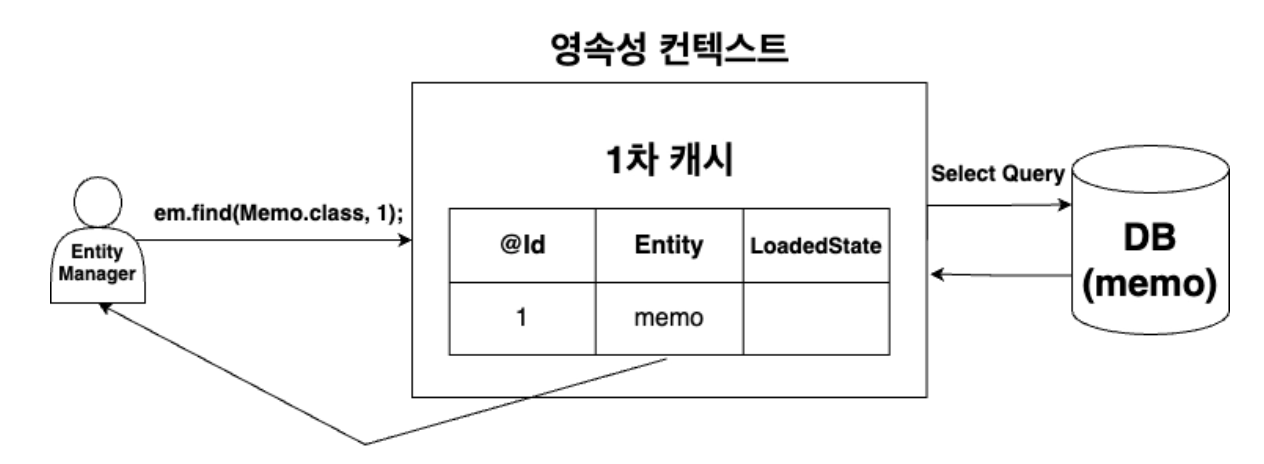
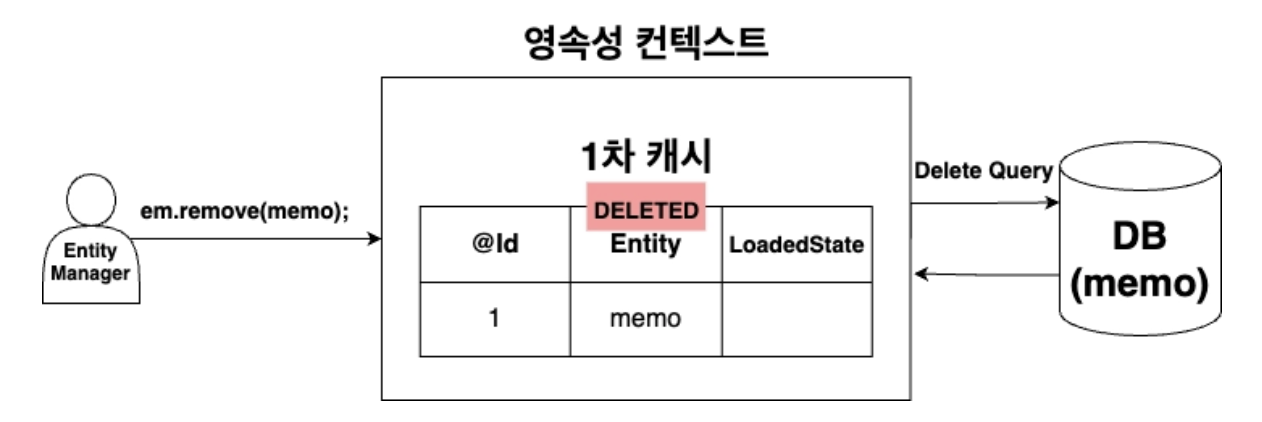
- After searching for the entity to be deleted, if it is not in the cache storage, search and store it in the DB.
em.remove(entity);When called, the entity to be deleted is changed from the MANAGED state managed by the persistence context to the DELETED state, and then after transaction commit, Delete SQL is requested to the DB.
Write Delay Storage (Action Queue)
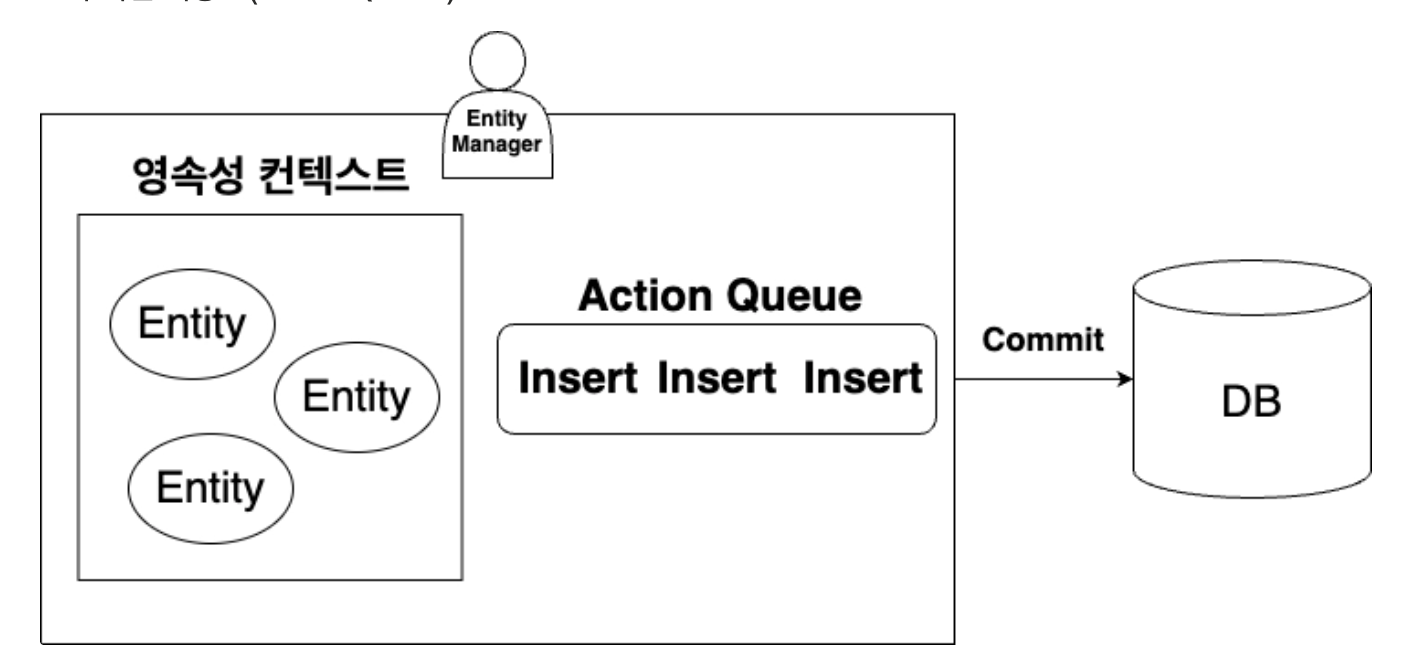
- JPA collects SQL like a transaction and reflects it in the DB at once by creating a write-delayed storage to collect the SQL and then reflects it in the DB at once after committing the transaction. -
flush()- There is an additional action after transaction commit, which is a call to the
em.flush();method. - The flush method is responsible for reflecting changes in the persistence context to the DB.
- In other words, it performs the role of requesting SQLs from the write delay storage to the DB.
- When you commit after flush, the SQL from the write delay storage has already been requested, so there is no more SQL to request, so the SQL record is not visible after the transaction is committed.
- There is an additional action after transaction commit, which is a call to the
- Insert, Update, Delete, that is, a transaction is required to request and reflect data change SQL to the DB (excluding queries)#### Change detection (Dirty Checking)
- If Update SQL is stored in write-lazy storage every time the Entity stored in the persistence context changes. -> It is inefficient because situations that can be handled with one Update SQL require multiple Update SQL requests.
- Update processing in JPA
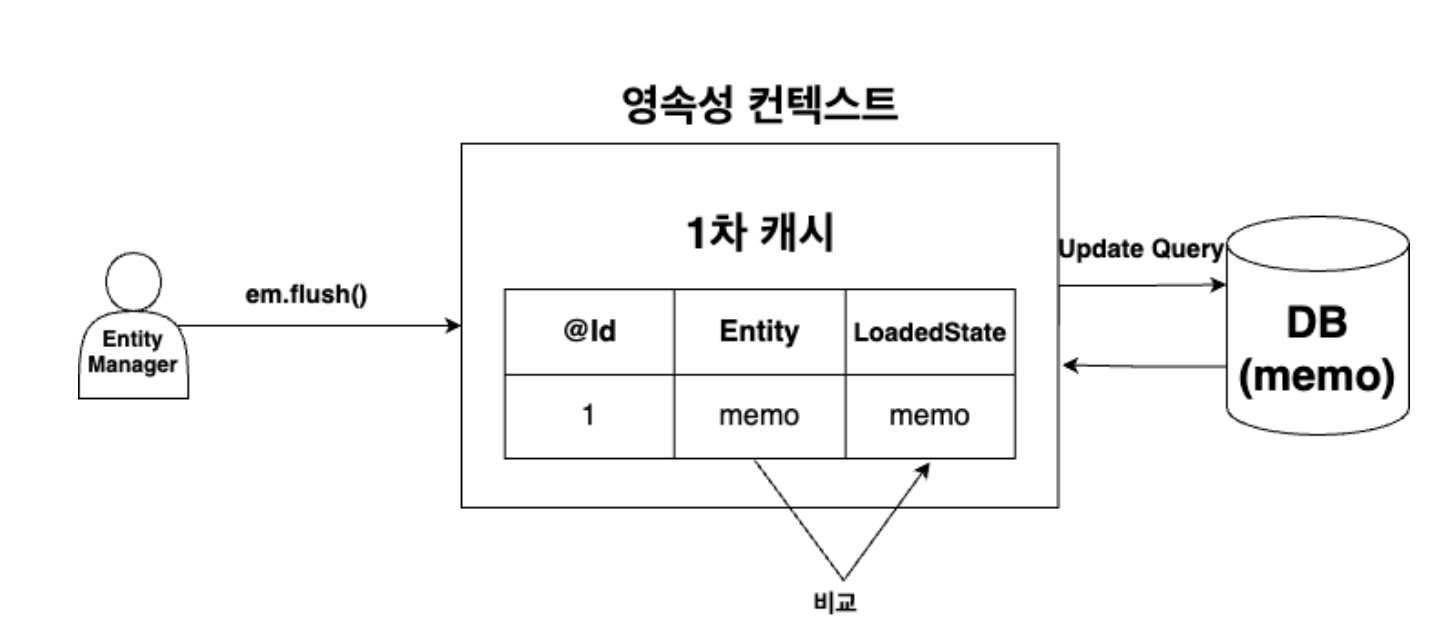
- JPA saves the initial state (LoadedState) when saving an Entity in the persistence context.
- When the transaction is committed and
em.flush();is called, the current state of the entity is compared with the saved initial state. - If there are any changes, create an Update SQL and save it in the write-delayed storage and request the SQL of all write-delayed storage to the DB.
- Finally, it is reflected when the DB transaction is committed.
- When the transaction is committed and
- Therefore, if there is data you want to change, search the data first and change the data of the corresponding Entity object, then Update SQL is automatically created and reflected in the DB.
- This process is called change detection or dirty checking.
- JPA saves the initial state (LoadedState) when saving an Entity in the persistence context.
(flush and commit execution order)
- flush occurs (SQL is executed, but rollback is still possible, reflected in DB (temporary state) -> automatically called when commit) -> update SQL occurs -> Send to DB 2.commit -> Transaction confirmed
State of Entity
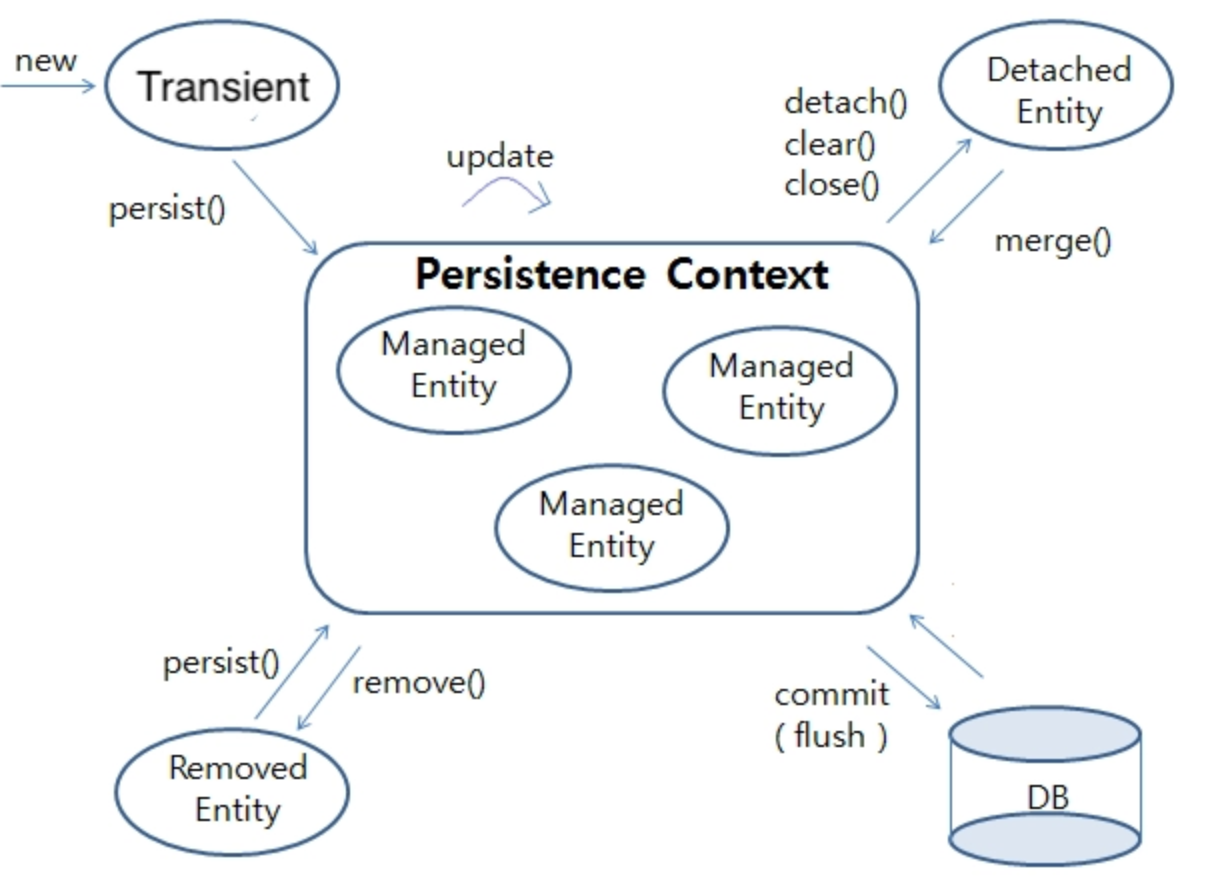
- Transient
Memo memo = new Memo();- Entity object instantiated via new operator
- Not managed by JPA because it is not yet stored in the persistence context.
- Because non-persistent state cannot be managed by JPA, change detection does not occur even if the data of the object is changed.
- Managed
em.persist(memo)- persist(entity): Makes a non-persistent Entity managed by storing it in the persistence context through EntityManager.
- Jun Yeong-sok (Detached)
It refers to a state that is stored and managed in a persistence context and then separated.
How to change from a persistent state to a semi-persistent state
em.detach(memo);- detach(entity): Converts only a specific entity to a semi-persistent state.
- Converted from Managed to Detached in persistence context
- When converted to a semi-persistent state, it is removed from the primary cache, i.e., cache storage, so it is not managed by JPA, so any functions of the persistence context cannot be used.
em.contains(memo);is a method that checks whether the object is stored and managed in the persistence context.
- detach(entity): Converts only a specific entity to a semi-persistent state.
em.clear();- clear(): Completely initializes the persistence context.
- Convert all Entities in the persistence context to a semi-persistent state.
- The persistence context frame is maintained, but the content is empty, so it is in the same state as a new one. -> So you can continue to use the persistence context.
- clear(): Completely initializes the persistence context.
em.close();- close(): Closes the persistence context.
- All entities in the persistent state managed by the persistence context are changed to the semi-persistent state.
- The persistence context cannot continue to be used because the persistence contest has ended.
- close(): Closes the persistence context.
How to change from a semi-persistent state back to a persistent state -
em.merge(memo);- merge(entity): Returns a new persistent Entity using the received Entity.
- Search the persistence context using the identifier value of the Entity passed as a parameter.
- What if the entity is not in the persistence context? a. Search the DB again b. Store the retrieved Entity in the persistence context c. Merge using the value of the passed Entity d. Update SQL performed (fix)
- What if it’s not in the DB? a. Store the newly created Entity in the persistence context b. Insert SQL performed (save)
- Search the persistence context using the identifier value of the Entity passed as a parameter.
- Therefore, the merge(entity) method can receive both non-persistent and semi-persistent parameters, and can either ‘save’ or ‘edit’ depending on the situation.
- In
em.contains(memo), false is returned for memo in a non-persistent state because the memo object was not stored in the persistence context after calling merge(), but was newly created as mergedMemo and stored in the persistence context.- Because the memo object is semi-persistent, the object does not currently exist in the persistence context. -> Therefore, after searching the DB using the identifier value, it is stored in the persistence context, and the value of the semi-persistent memo object received as a parameter is merged into the newly saved persistent object and returned.
- merge(entity): Returns a new persistent Entity using the received Entity.
- Removed
em.remove(memo); - remove(entity): Receives the entity in persistent state that has been searched for deletion as a parameter and switches it to the deletion state.
(.find(): If it is not in the cache storage, the DB search result is immediately put into the primary cache, and taken out from the cache from next time)
JPA in SpringBoot
-build.gradle
1
2
// JPA 설정
implementation 'org.springframework.boot:spring-boot-starter-data-jpa'
- application.properties: Hibernate settings ``` groovy spring.jpa.hibernate.ddl-auto=update
spring.jpa.properties.hibernate.show_sql=true spring.jpa.properties.hibernate.format_sql=true spring.jpa.properties.hibernate.use_sql_comments=true
1
2
3
4
5
6
7
8
9
10
11
12
13
14
15
16
17
18
19
20
21
22
23
24
25
26
27
28
29
30
31
32
33
34
35
36
37
38
39
40
41
42
43
44
45
46
47
48
49
50
51
52
53
54
55
56
57
58
- Hibernate outputs all SQL requests to the DB in an attractive manner.
-ddl-auto
- create: Delete the existing table and create it again (DROP + CREATE)
- create-drop: Same as create, but drops the table at the end.
- update: Only changes are reflected
- validate: Check only whether the entity and table are mapped properly
- none: Do not check anything
- In the SpringBoot environment, EntityManagerFactory and EntityManager are automatically created.
- If you pass DB information to application.properties, EntityManagerFactory is created based on this.
- You can use the automatically created EntityManager by injecting it using the `@PersistenceConext` annotation.
#### Transactions in Spring
- The Spring framework provides a transaction manager to apply DB’s transaction concept to applications.
- You can easily apply the transaction concept by adding the `@Transactional` annotation to a class or method.
- When a method is called, all DB operations performed within the method are bundled into one transaction.
- At this time, if the method is performed normally, the transaction is committed, and if an exception occurs, it is rolled back.
- `@Transactional` declared in the class grants transaction functionality to all methods within the class.
- At this time, the save method has the `@Transactional` annotation added to the method in addition to the class, so the `readOnly = true` option, `@Transactional`, is overwritten and applied as the `readOnly = false` option (because you cannot just look it up, you have to change it)
#### `@Transactional`
- Transaction application is required to save, modify, or delete data in the DB using JPA.
- Since the query task simply reads data, transaction application is not required.
- However, even in the case of inquiries, there may be cases where a transaction environment is necessary.
- It is recommended to apply `@Transactional` with the `readOnly = true` option set only when the method has only a query operation function.
#### Persistence context and transaction life cycle
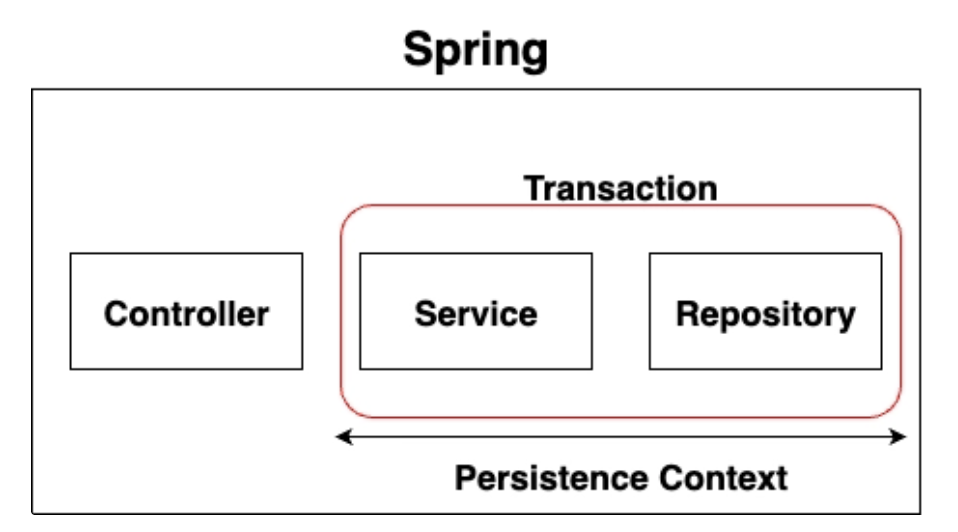
- In the Spring container environment, the persistence context and transaction life cycle are consistent.
- Since the persistence context is maintained while the transaction is maintained, the functionality of the persistence context can be used.
**How can Spring maintain transactions from Service to Repository**
- The Spring environment provides **transaction propagation** function to control transactions in such situations.
#### Transaction propagation
- Transaction propagation options can be specified in `@Transactional`
`@Transactional(propagation = Propagation.REQUIRED)`
- The default option for transaction propagation is **REQUIRED**.
- **REQUIRED** option means that if a transaction exists in the parent method, the child method's transaction joins the parent's transaction.
### Spring Data JPA
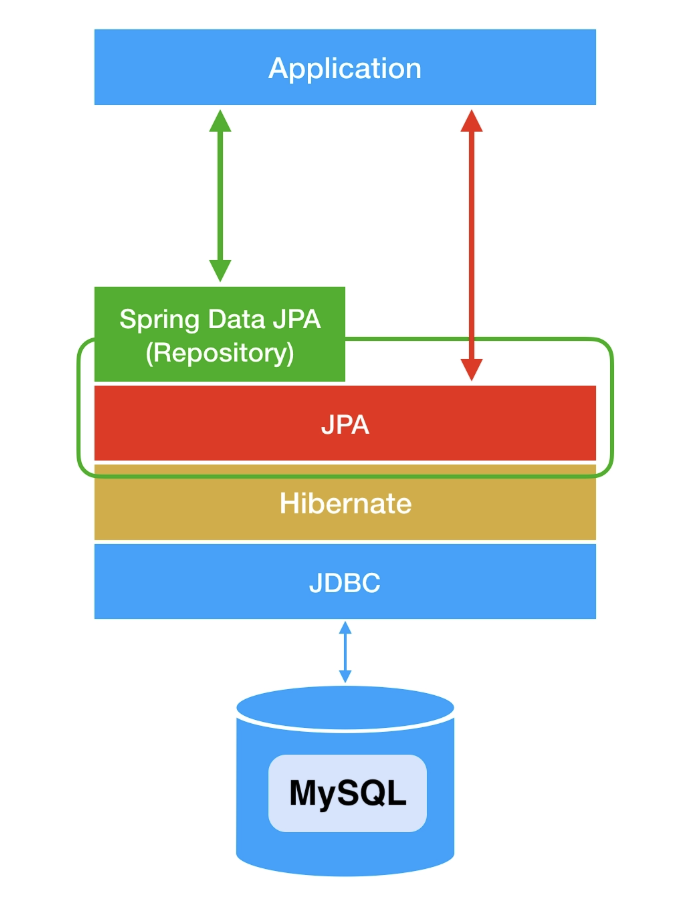
> **Spring Data JPA**
: A module designed to make it easy to use JPA
- Provides **Repository interface** that abstracts JPA
- The Repository interface is used through classes implemented using a JPA implementation such as Hibernate.
#### SimpleJpaRepository in Spring Data JPA
- Spring Data JPA automatically creates a class that implements the JpaRepository interface.
- When the Spring server starts up, interfaces that inherit the JpaRepository interface are automatically scanned.
- Automatically creates the SimpleJpaRepository class based on the information of the interface and registers this class as Spring 'Bean'.
-> You can use JPA functions through the JpaRepository interface without having to write an implementation class of the interface yourself.
#### How to use Spring Data JAP
- Register JpaRepository
``` java
public interface MemoRepository extends JpaRepository<Memo, Long> {
}
JpaRepository<"@Entity 클래스", "@Id의 데이터 타입">is declared as an inherited interface.- Bean registered automatically by Spring Data JPA
- Because the Memo Entity was added to the
@Entity 클래스location in the generics, the MemoRepository is connected to the memo table in the DB and becomes an interface to process CRUD operations.
Notepad project Spring Data JPA application
-save
1
2
3
4
5
6
7
8
9
10
11
12
public MemoResponseDto createMemo(MemoRequestDto requestDto) {
    // RequestDto -> Entity
    Memo memo = new Memo(requestDto);

    // DB 저장
    Memo saveMemo = memoRepository.save(memo);

    // Entity -> ResponseDto
    MemoResponseDto memoResponseDto = new MemoResponseDto(saveMemo);

    return memoResponseDto;
}
If you check the save method of SimpleJpaRepository, you will see that code has been written to save the entity in the persistence context.
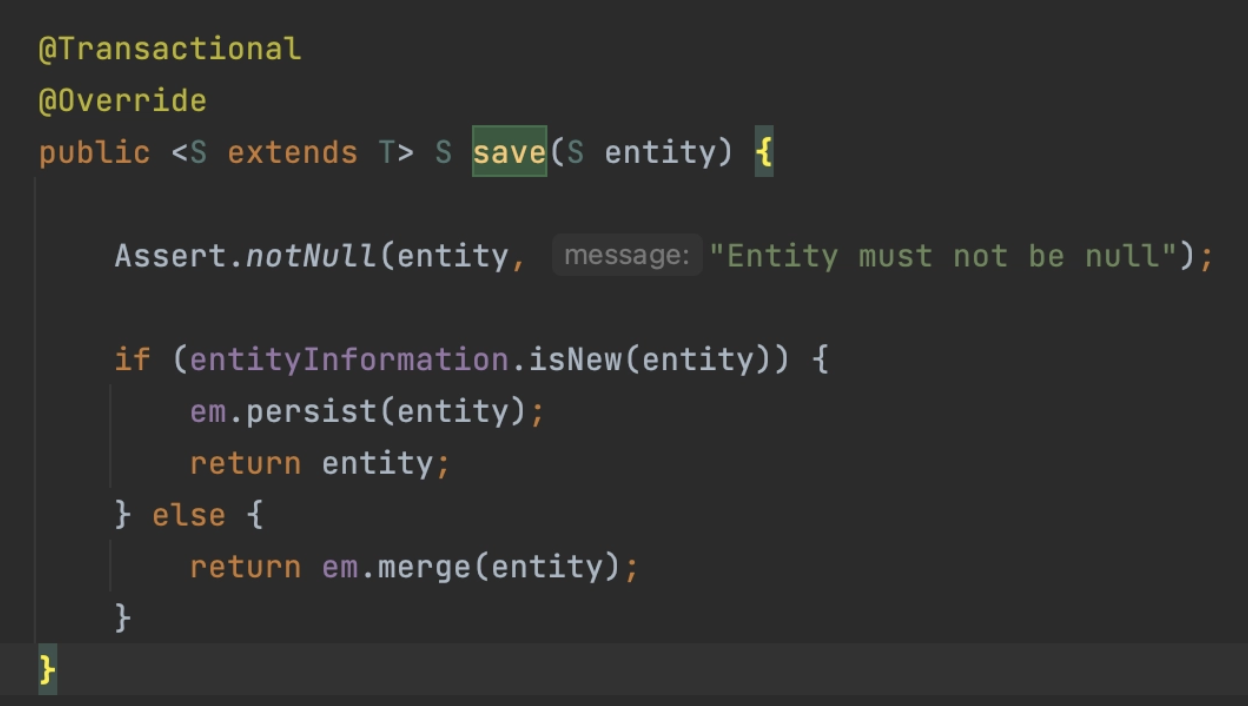
You can save data using the save method
- Enter the entity object you want to save as a parameter.
- You can check that
@Transactionalis applied to the method.
-findAll
1
2
3
4
public List<MemoResponseDto> getMemos() {
    // DB 조회
    return memoRepository.findAll().stream().map(MemoResponseDto::new).toList();
}
- Since the return is received as a List data type, it must be converted and returned.
- You can search all data in the table using the findAll method.

-findById
1
2
3
4
5
private Memo findMemo(Long id) {
    return memoRepository.findById(id).orElseThrow(() ->
            new IllegalArgumentException("선택한 메모는 존재하지 않습니다.")
    );
}
- If you check the findById method of SimpleJpaRepository, you can see that the return type is Optional.
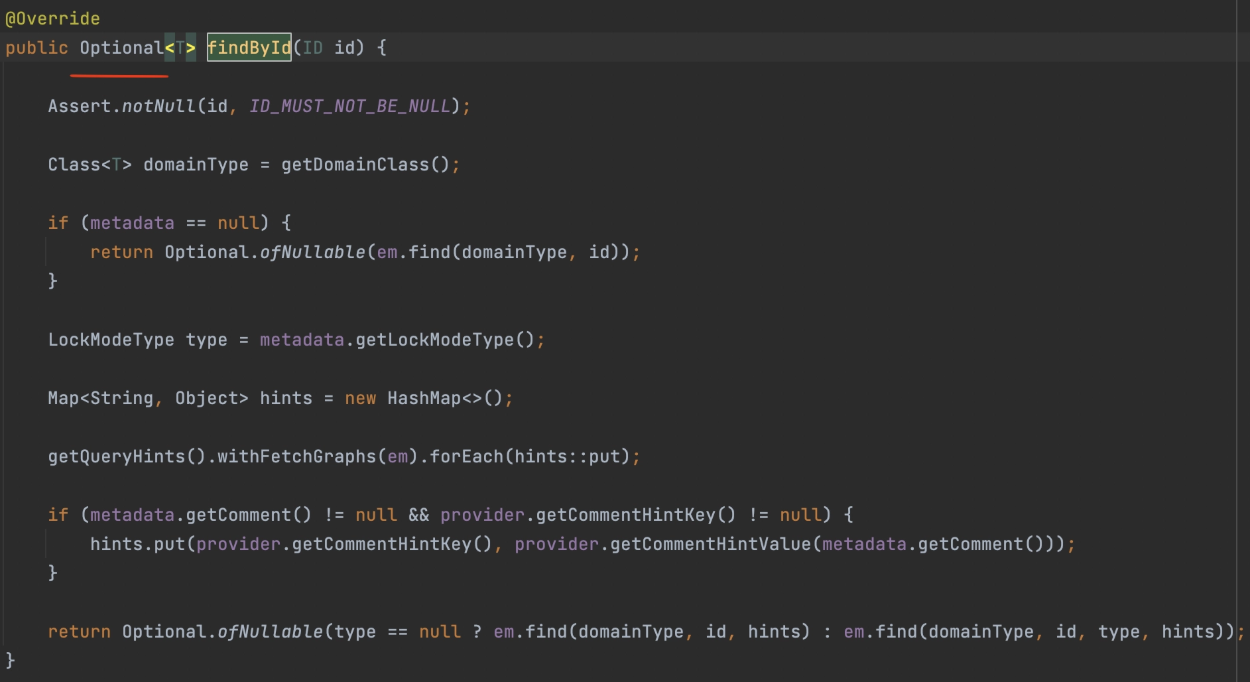
- Receive Optional
as the return type and additionally check for null. - As shown in the code above, you can use orElseThrow to throw an exception if the return value is null.
- The Optional return type is a box that expresses that there may or may not be a value, so you must check if it is null.- update
1
2
3
4
5
6
7
8
9
10
@Transactional
public Long updateMemo(Long id, MemoRequestDto requestDto) {
// 해당 메모가 DB에 존재하는지 확인
Memo memo = findMemo(id);

// memo 내용 수정
memo.update(requestDto);

return id;
}
- The Optional return type is a box that expresses that there may or may not be a value, so you must check if it is null.- update
- There is no method called update in SimpleJpaRepository.
- Therefore, the update must be performed through change detection in the persistence context as shown in the code above.
Add
@Transactionalto the method to apply change detection.- delete
1
2
3
4
5
6
7
8
9
public Long deleteMemo(Long id) {
  // 해당 메모가 DB에 존재하는지 확인
  Memo memo = findMemo(id);

  // memo 삭제
  memoRepository.delete(memo);

  return id;
}
- The entity (data) can be deleted from the table using the delete method.
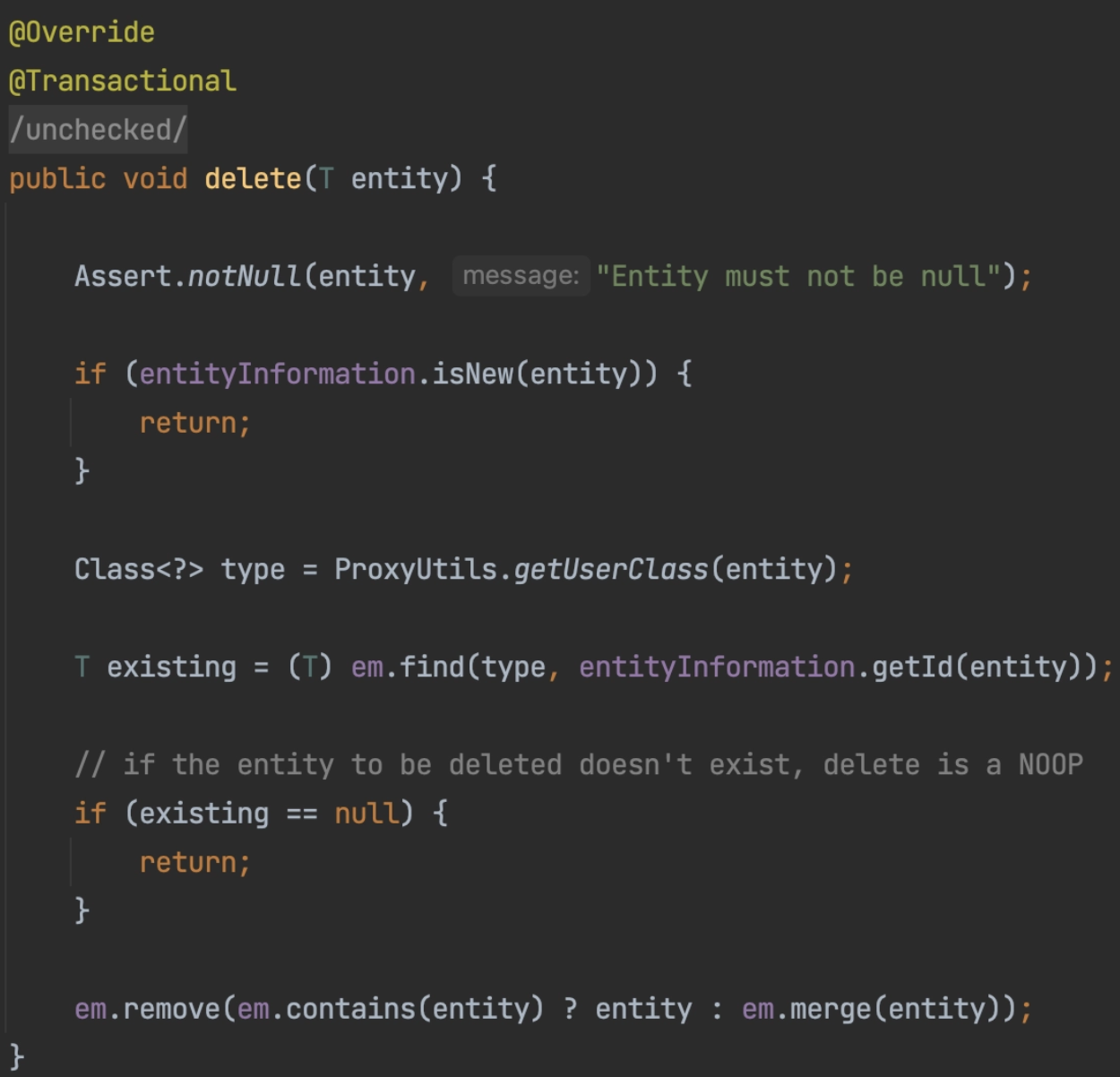
- Enter the entity object you want to delete as a parameter.
- You can see that
@Transactionalis applied to the delete method.