[TIL] Spring Basics - Test Code and Spring MVC
JUnit unit testing, Lombok annotations, application.properties, and Spring MVC architecture including DispatcherServlet and Front Controller
한국어 원문은 여기에서 볼 수 있습니다.
What I did today
- Introduction to Spring
What I learned today
Test code
bug bug Software produces unexpected results
How to find bugs before deploying development code
- Black box testing A method of inspecting the operation of the software in a black box-like state without knowing the internal structure or operating principles, that is, from the perspective of the user of the web service. Advantage: Anyone can test Disadvantage: As functions increase, the scope of testing increases, and test quality may vary depending on the tester.
- Developer testing Developers write test code to verify their own code. Advantages: Fast and accurate testing, test automation, convenient when refactoring or adding features Disadvantages: takes a long time to develop, incurs test code maintenance costs
JUnit Unit testing framework for the Java programming language
already added to build.gradle -> Ready to use JUnit
- Create test file
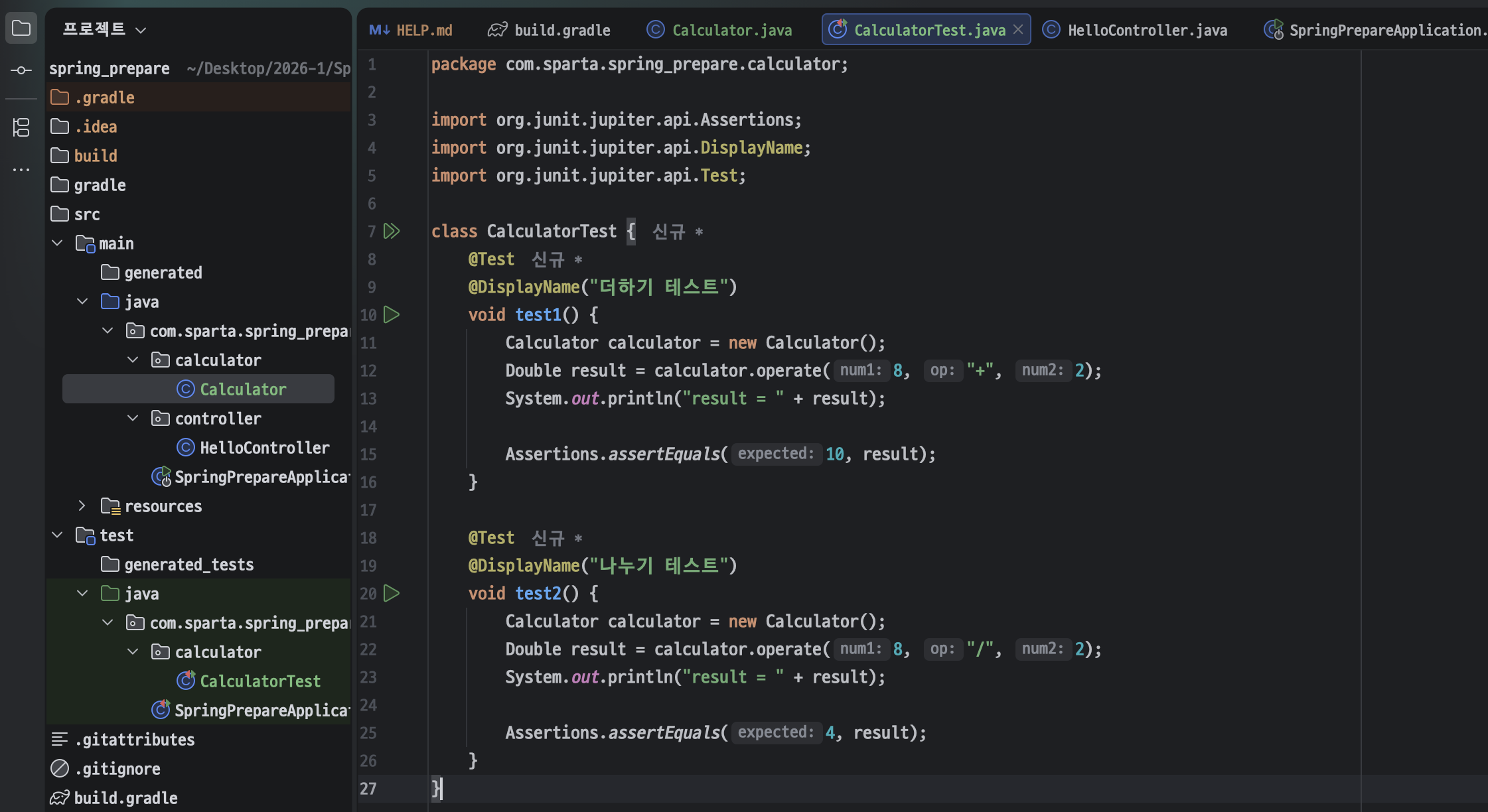 I learned that Java always starts with the main() method and ends with the main() method. Because JUnit has a test execution environment, you can write and run test code for each method or function without separately executing the main() method or running the server, as shown in the picture.
Lombok and application.properties
Lombok A library that helps save code by automatically generating methods/constructors that are almost essential for running a Java project.
@Getter, @Setter
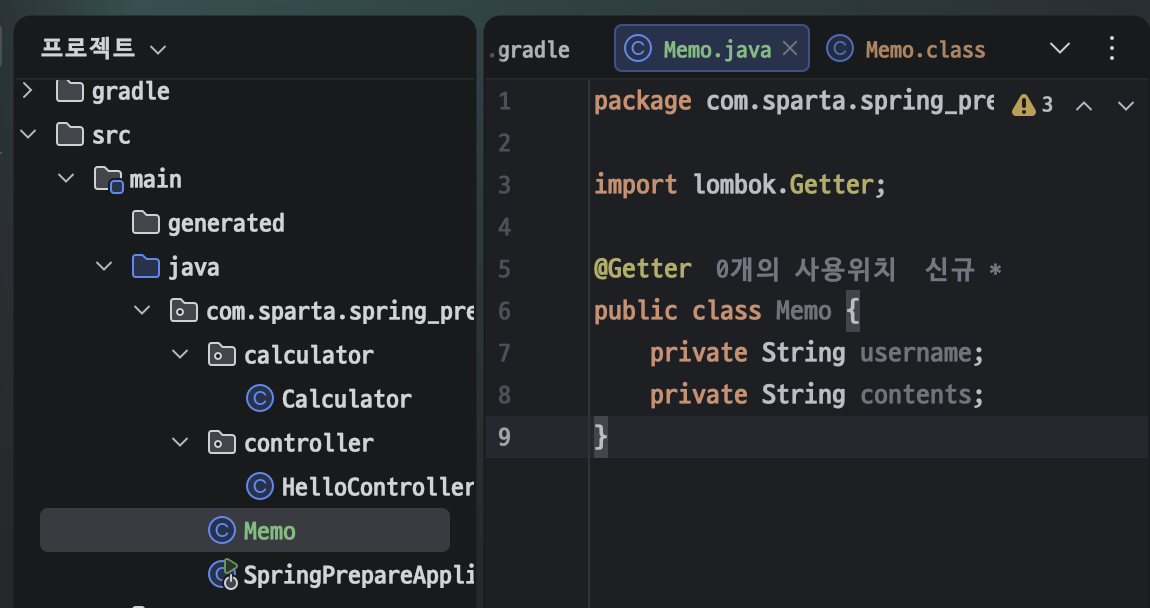 Memo Java class creation | 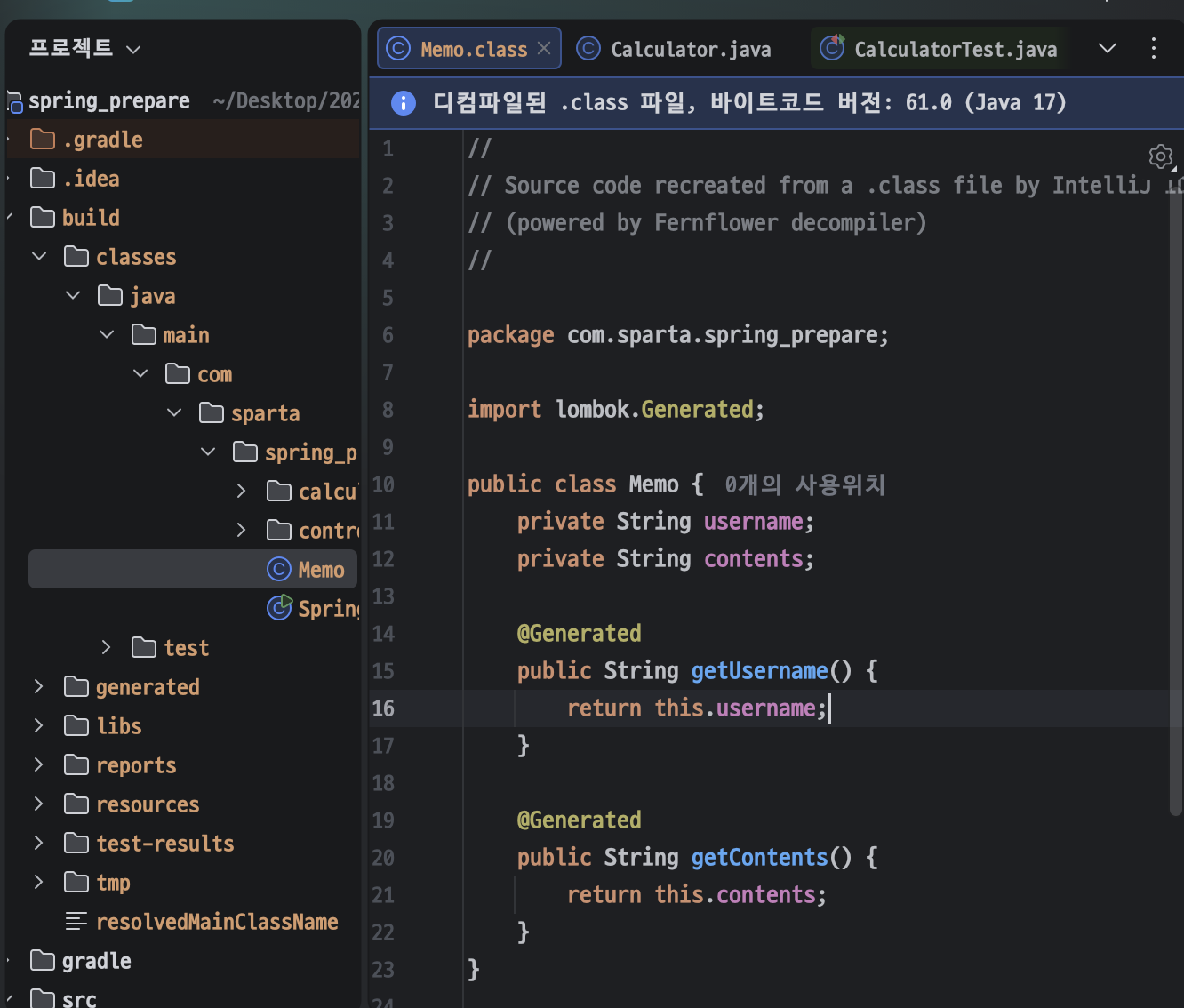 getUsername() and getContents() methods that were not entered directly You can check that it is created automatically through the @Getter annotation. (also @Setter) |
@AllArgsConstructor, @NoArgsConstructor Creates an overloaded constructor with the default constructor and all fields as parameters.
- If you create an overloaded constructor with
@AllArgsConstructor, - In Java, if even one constructor is defined, a default constructor is not automatically created. -> Therefore, create a default constructor through
@NoArgsConstructor. @RequiredArgsConstructor Creates an overloaded constructor with a field with a final modifier as a parameter.
application.properties File used to configure settings related to Spring
- src > main > resources > application.properties
- Setting values that are automatically set through SpringBoot can be easily modified.
- When connecting to a DB, you must provide DB information, and even in this case, you can easily transfer values using this file.
MySQL
Terminal
- MySQL connection Move
cd /usr/local/mysql/binlocation./mysql -u root -pMySQL connection -> Enter password
Spring MVC
MVC (Model-View-Controller) One of the software design patterns
- MVC pattern: The elements that make up the software are divided into Model, View, and Controller and their respective roles are separated.
- By separating the elements that make up the software, it increases the reusability and maintainability of the code and facilitates collaboration between developers. -Model
- Responsible for data and business logic
- Perform tasks such as saving and loading data in conjunction with the database. -View
- Responsible for user interface
- Design and implement screens, buttons, forms, etc. that users see. -Controller
- Coordinates and controls the interaction between Model and View
- Receives user input and passes it to the Model, and updates the View based on the Model’s results.
Spring MVC (Spring Web MVC) A unique web framework built on the Servlet API
- Included in Spring Framework from the beginning
- DispatcherServlet centrally processes HTTP requests and is designed in the Front Controller pattern. -> HTTP requests are processed efficiently by applying the MVC pattern in Spring.
Servlet: A server-side program or specification that dynamically creates web pages using Java.
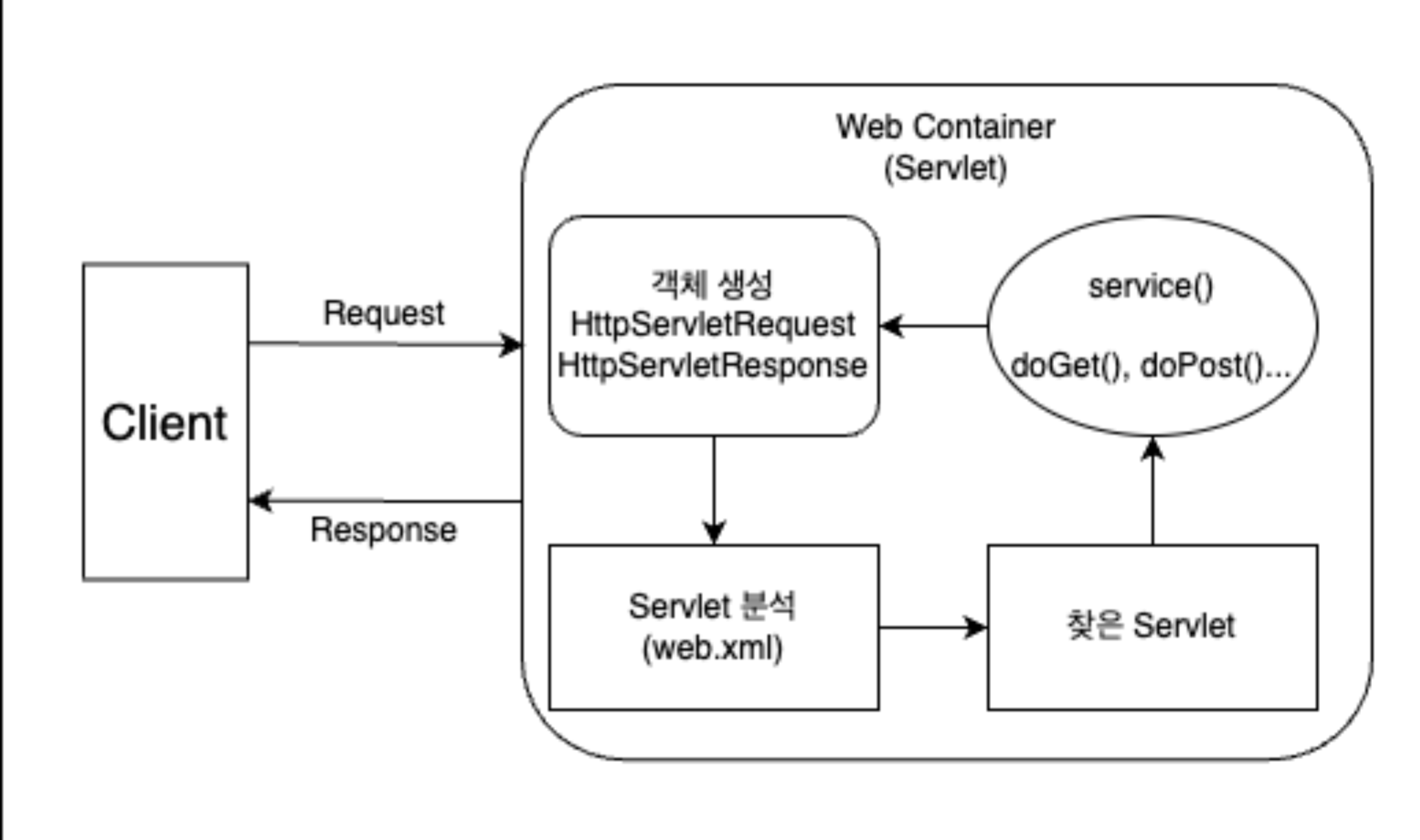 Let’s find out how the server’s servlet operates when a user requests an (HTTP) API. Let’s find out how the server’s servlet operates when a user requests an (HTTP) API. |
- The user makes an HTTP Request, or API request, to the server through the client (browser).
- The Servlet container that received the request creates HttpServletRequest and HttpServletResponse objects.
- An object for easily using data contained in HTTP while meeting the promised HTTP specifications
- Find out which Servlet the request is for through the set information.
- After calling the service method in the relevant Servlet, call methods such as doGet or doPost according to the browser’s request method.
- Return the results of the called methods as is, or create a dynamic page and receive a response from the HttpServletResponse object and return it to the Client (browser).
- When the response is completed, destroy the created HttpServletRequest and HttpServletResponse objects.
Front Controller
- If you implement all API requests according to the Servlet operation method discussed earlier, you must implement countless Servlet classes. -> Therefore, Spring efficiently processes API requests using the Front Controller pattern using DispatcherServlet.
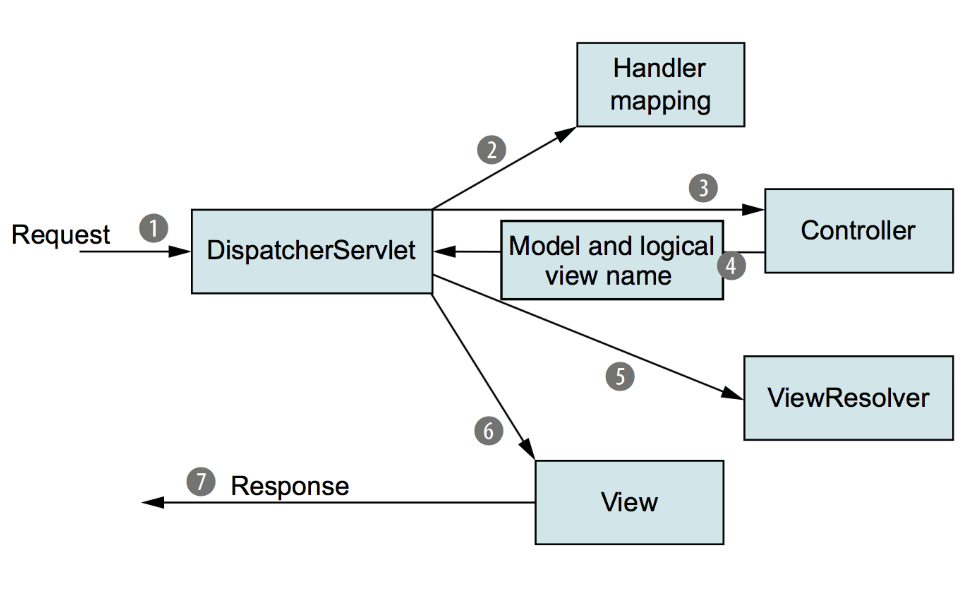 Operation process of Front Controller pattern Operation process of Front Controller pattern |
- When an HTTP request comes in from a client (browser), the DispatcherServlet object analyzes the request.
- The DispatcherServlet object finds the Controller through Handler mapping based on the analyzed data and delivers the request. Handler mapping: API path and Controller method are matched ex)
@GetMapping("/api/hello")GET /api/hello → hello() function of HelloController GET /user/login → login() function of UserController GET /user/signup → signup() function in UserController POST /user/signup → registerUser() function of UserController
-> HTTP requests can be easily processed by DispatcherServlet without directly implementing Servlet.
- Controller -> DispatcherServlet
- After completing the processing of the request, the controller delivers the results of the processing, that is, data (‘Model’) and ‘View’ information.
- DispatcherServlet -> Client
- Apply the Model to the View through ViewResolver and deliver the View to the Client as a response
What to learn tomorrow
- Spring introductory course
- Algorithm problem 2
- Spring Advanced Course