[Java] Programmers - Java Basics
한국어 원문은 여기에서 볼 수 있습니다.
Find the quotient
https://school.programmers.co.kr/learn/courses/30/lessons/120805
To get the quotient in Java, you must use /.
Integer / Integer → Returns the quotient of an integer value.
Real number / Integer → If at least one of the numbers is a real number, the quotient of the real number is provided.
In Java, the // symbol means a comment, so the quotient cannot be obtained with // like in Python.
Addition of fractions
https://school.programmers.co.kr/learn/courses/30/lessons/120808
1
2
3
4
5
6
7
8
9
10
11
12
13
14
15
16
17
18
19
20
class Solution {
    public int[] solution(int numer1, int denom1, int numer2, int denom2) {
        int[] answer = new int[2];

        answer[0] = numer1*denom2 + numer2*denom1;
        answer[1] = denom1 * denom2;

        while(answer[0] != 1) {
            for(int i = answer[1]; i>=1; i--) {
                if (answer[0] % i == 0 && answer[1] % i == 0) {
                    answer[0] /= i;
                    answer[1] /= i;

                }
            }
        }

        return answer;
    }
}
- Error in the first code
- Just because it is an irreducible fraction does not mean that all numerators are 1.
- Even if the numerator is not 1, the repetition must end when it becomes an irreducible fraction.
To reduce, the priority is to find the smaller value between the numerator and the denominator.
- Also, in the for statement that repeats from the denominator number to 1, 1 has no meaning in the short form, so there is no need to check it.
1
2
3
4
5
6
7
8
9
10
11
12
13
14
15
16
17
18
  class Solution {
      public int[] solution(int numer1, int denom1, int numer2, int denom2) {
          int[] answer = new int[2];

          answer[0] = numer1*denom2 + numer2*denom1;
          answer[1] = denom1 * denom2;

          for(int i = Math.min(answer[0], answer[1]); i>=2; i--) {
              if (answer[0] % i == 0 && answer[1] % i == 0) {
                  answer[0] /= i;
                  answer[1] /= i;
                  break;
              }
          }

          return answer;
      }
  }
- Just because it is an irreducible fraction does not mean that all numerators are 1.
- Code after modification
If you divide by the greatest common divisor, it becomes an irreducible fraction → There is no need for the
whilestatement.Use
Math.min()→ Returns the smaller of the numerator and denominator
Find median
https://school.programmers.co.kr/learn/courses/30/lessons/120811
Arrays in Java
Array declaration
1
  int[] arr;
Create array
1
  int[] arr = new int[5];
Initialization at the same time as array declaration
1
  int[] arr = {10, 20. 30, 40, 50};
Check array length
1
2
  len = arr.length;
  System.out.println(arr.length);
Array sorting
Use
Arrays.sort()method1 2 3 4 5 6 7 8
import java.util.Arrays; int[] arr = {5, 2, 8, 1, 3}; Arrays.sort(arr); System.out.println(Arrays.toString(arr)); // [1, 2, 3, 5, 8]
Arrays.sort(arr);→ Sort the array in ascending orderArrays.toString(arr)→ Outputs the elements of the array in string form.If you just use
System.out.println(arr);→ a string indicating the type and hash code of the array is output, not the elements of the array.1
[I@15db9742
1
2
3
4
5
6
7
8
9
  import java.util.Arrays;
  import java.util.Collections;

  Integer[] arr = {5, 2, 8, 1, 3};

  Arrays.sort(arr, Collections.reverseOrder());

  System.out.println(Arrays.toString(arr));
  // [8, 5, 3, 2, 1]
Arrays.sort(arr, Collections.reverseOrder());
→ Sort in descending orderCollections.reverseOrder()→ Comparison criteria used for sorting in descending order
You must use the
Integer[]array, notint[].int[]is a basic data type array.Integer[]is a reference type array.Integeris a wrapper class to handleintas an object.Integer[]is an array that stores references toIntegerobjects
→
Collections.reverseOrder()returnsComparator, which compares objects. Therefore,Arrays.sort(배열, Comparator)can only be used in object arrays, so it cannot be applied toint[].
Find the mode
https://school.programmers.co.kr/learn/courses/30/lessons/120812
My solution
1
2
3
4
5
6
7
8
9
10
11
12
13
14
15
16
17
18
19
20
21
22
23
24
25
26
27
28
29
class Solution {
    public int solution(int[] array) {
        int[] answer = new int[1000];

        for(int i = 0; i<array.length; i++) {

            answer[array[i]] += 1;
        }

        int[] max = new int[3]; // 0: max 값 1: max 인덱스 2: 그 전 max 값
        max[0] = 0;

        for(int i = 0; i<answer.length; i++) {
            if(answer[i] > max[0]) {
                max[0] = answer[i];
                max[2] = answer[i];
                max[1] = i;
            } else if (answer[i] == max[0]) {
                max[2] = -1;
            }
        }

        if (max[2] != -1) {
            return max[1];
        } else {
            return -1;
        }
    }
}
Better solution
1
2
3
4
5
6
7
8
9
10
11
12
13
14
15
16
17
18
19
20
21
22
23
class Solution {
    public int solution(int[] array) {
        int[] count = new int[1000];

        for (int num : array) {
            count[num]++;
        }

        int max = 0;
        int answer = 0;

        for (int i = 0; i < count.length; i++) {
            if (count[i] > max) {
                max = count[i];
                answer = i;
            } else if (count[i] == max) {
                answer = -1;
            }
        }

        return answer;
    }
}
Improved use of for loop
Usingfor(int num : array), take out the elements of the array one by one and assign them to num.Use variable instead of max array
An array was created to check for duplicates, but since it is not needed, the mode value can be checked directly as a variable.
If the mode value is duplicated while looping through the for loop until the end, -1, and if the new value is greater than the saved max value, it is saved as the mode value again.
Another solution
1
2
3
4
5
6
7
8
9
10
11
12
13
14
15
16
17
18
19
20
21
22
23
24
25
26
27
import java.util.HashMap;

class Solution {
    public int solution(int[] array) {
        HashMap<Integer, Integer> map = new HashMap<>();

        for (int num : array) {
            map.put(num, map.getOrDefault(num, 0) + 1);
        }

        int max = 0;
        int answer = 0;

        for (int num : map.keySet()) {
            int count = map.get(num);

            if (count > max) {
                max = count;
                answer = num;
            } else if (count == max) {
                answer = -1;
            }
        }

        return answer;
    }
}
Utilization of
HashMap
It is simpler to use an array for the problem, but if the number range is large or contains negative numbers, you can also useHashMap.map.put(num, map.getOrDerfault(num, 0) + 1);→getOrDefault(num, 0)retrieves the number of existing appearances if the number is already stored, and returns 0 if not.
I hate even numbers
https://school.programmers.co.kr/learn/courses/30/lessons/120813
Solution
1
2
3
4
5
6
7
8
9
10
11
12
13
14
15
16
17
18
import java.util.ArrayList;
import java.util.Arrays;

class Solution {
    public int[] solution(int n) {
        ArrayList<Integer> array = new ArrayList<>();

        for(int i = 1; i<=n; i++) {
            if(i%2 != 0) {
                array.add(i);
            }
        }

        int[] answer = array.stream().mapToInt(Integer::intValue).toArray();

        return answer;
    }
}
An array must be returned in the answer, but since I did not know how many values would be in the array while solving the problem, I used ArrayList.
ArrayListAn array-based data structure whose size dynamically changes provided by Java.
- No need to specify the number of elements initially
- Internal storage automatically expands as needed as you add elements
Check element count with
arr.size()- Basic data types such as
intanddoublecannot be used as type arguments.- Uses
intpresidential election wrapper classInteger
- Uses
int[] answer = array.stream().mapToInt(Integer::intValue).toArray();stream()→ CreateStremso that the elements of the list can be processed in order.Convert
mapToInt(Integer::intValue)→Integerobjects to basic data typeintvalues.toArray()→ Return the converted values in an array
- Declare as ArrayList
ArrayList<Integer> array = new ArrayList<>();
→ Variable type:
ArrayList, actual created object:ArrayList- Declare as List
List<Integer> array = new ArrayList<>();
→ Variable type:
List, actual created object:ArrayList⇒
Listis an interface, andArrayListis a class that implements the List interface.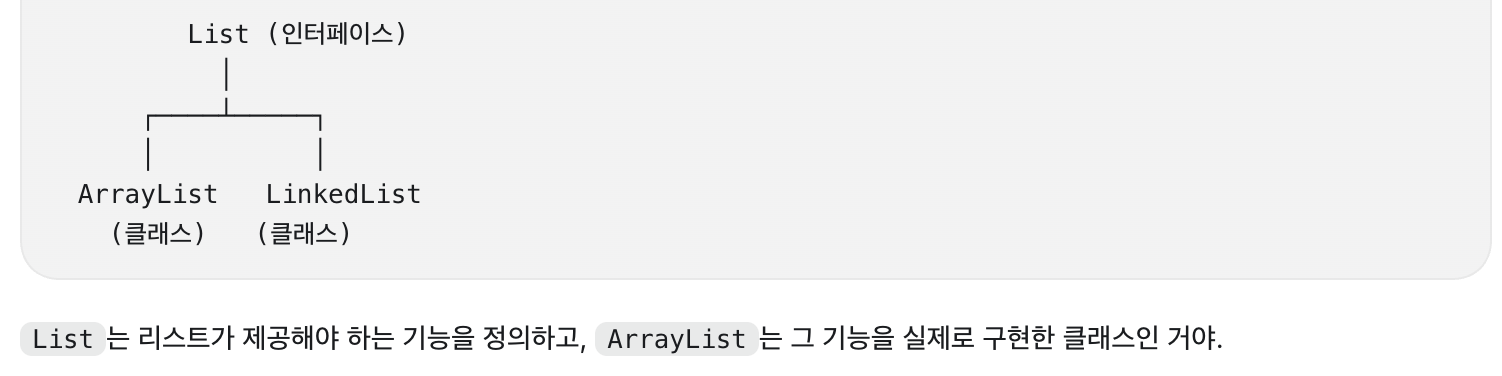
- Reason for declaring as List
If you declare it asList<Integer> array = new ArrayList<>();and later want to change it toLinkedList→ just change the part that creates the object toList<Integer> array = new LinkedList<>();. (Of course, LinkedList must also be imported separately)
⇒ Therefore, variables are generally declared as interface types, and actual objects are created as implementation classes.
Flipped string
https://school.programmers.co.kr/learn/courses/30/lessons/120822
Java string
String declaration and initialization
String str = "Hello";String str2 = new String("Hello");Difference between String and char
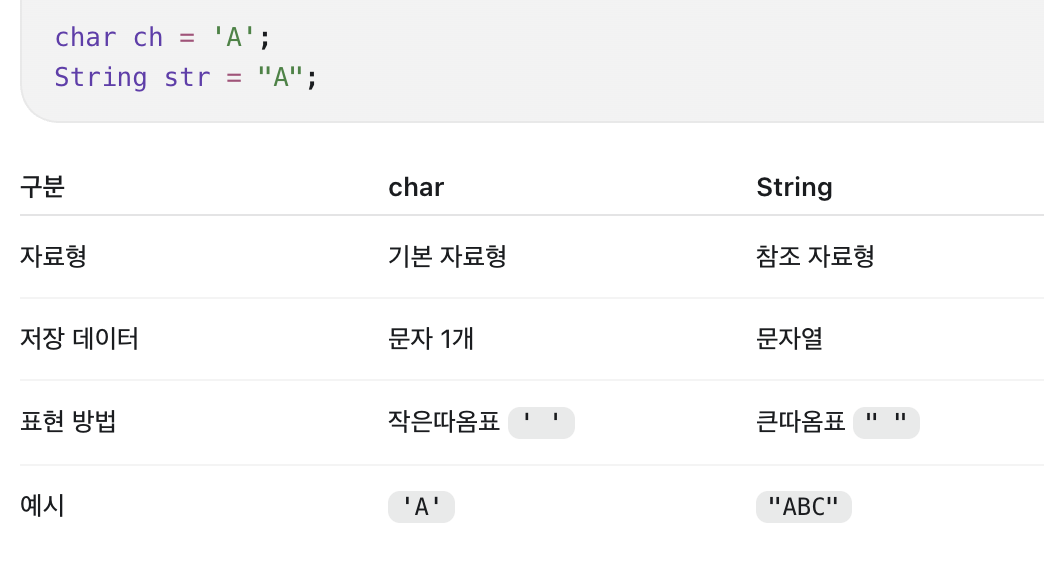
Main methods related to strings
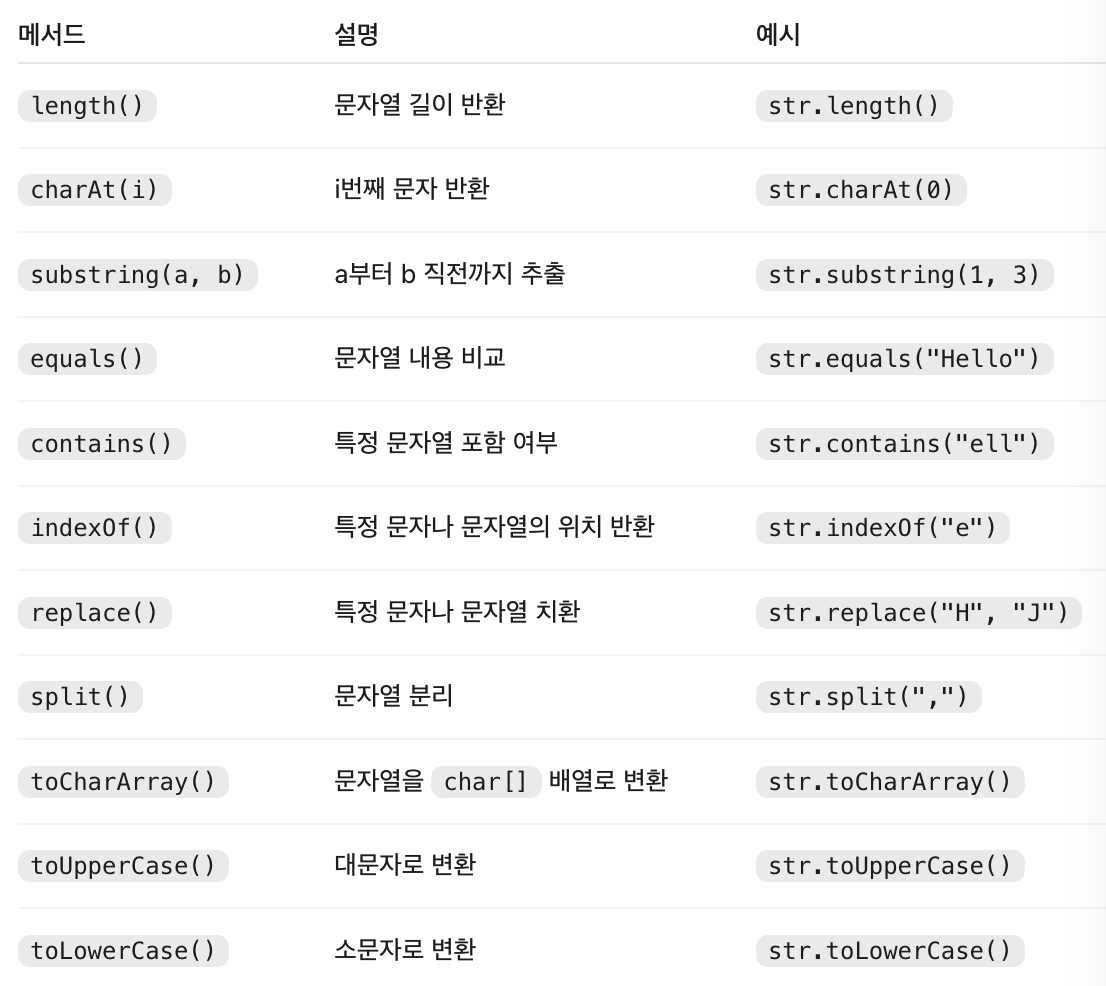
String concatenation
In Java, you can concatenate strings using the+operator.String comparison
When comparing the contents of strings,equals()must be used.The reason why
==cannot be used → Because the addresses are compared to see if the two variables refer to the same object.Strings are immutable objects
Once Java’sStringis created, the contents of the object cannot be changed.1 2 3 4 5
String str = "Hello"; str.replace("H", "J"); System.out.println(str); // Hello
→
replace()returns a new string rather than modifying the original string.1 2 3
str = str.replace("H", "J"); System.out.println(str); // Jello
Age of exoplanets
https://school.programmers.co.kr/learn/courses/30/lessons/120834
Solution
1
2
3
4
5
6
7
8
9
10
11
12
13
14
15
16
class Solution {
    public String solution(int age) {
        String answer = "";

        String alpha = "abcdefghij";

        String str = String.valueOf(age);

        for (int i = 0; i < str.length(); i++) {
            int num = str.charAt(i) - '0';
            answer += alpha.charAt(num);
        }

        return answer;
    }
}
Convert numbers to strings
String str = String.valueOf(age);→ Convert the number to a string and usecharAt()to access each digit.Convert letters to numbers
int num = str.charAt(i) - '0';→charAt()returns typechar⇒ What you need is an integer number index! → **If you perform a subtraction operation between characters in Java, the calculation is based on the Unicode value, so numeric characters are converted to integers like‘2’ - ‘0’.